Updated Mendeley plugin for ONLYOFFICE: smarter citations, custom styles, and better compatibility
Summary
The updated Mendeley plugin for ONLYOFFICE enhances citation management with smarter workflows, custom styles, and improved compatibility with Microsoft Word. Users can now easily edit citations, add prefixes and suffixes, and manage bibliographies more effectively, reducing the time spent on manual adjustments. This makes it an invaluable tool for students, researchers, and academics looking to streamline their writing process.
- Redesigned interface for smoother navigation.
- Improved compatibility with Microsoft Word.
- Supports custom citation styles and formats.
- New features for editing citations quickly.
- Enhanced bibliography formatting options available.
The latest update to the Mendeley plugin for ONLYOFFICE editors is here, packed with upgrades that make citation management a whole lot easier. Whether you’re a student, a researcher, or part of an academic team, you’ll notice it right away: the new features mean less time fussing with references and more time actually writing.

Refreshed interface
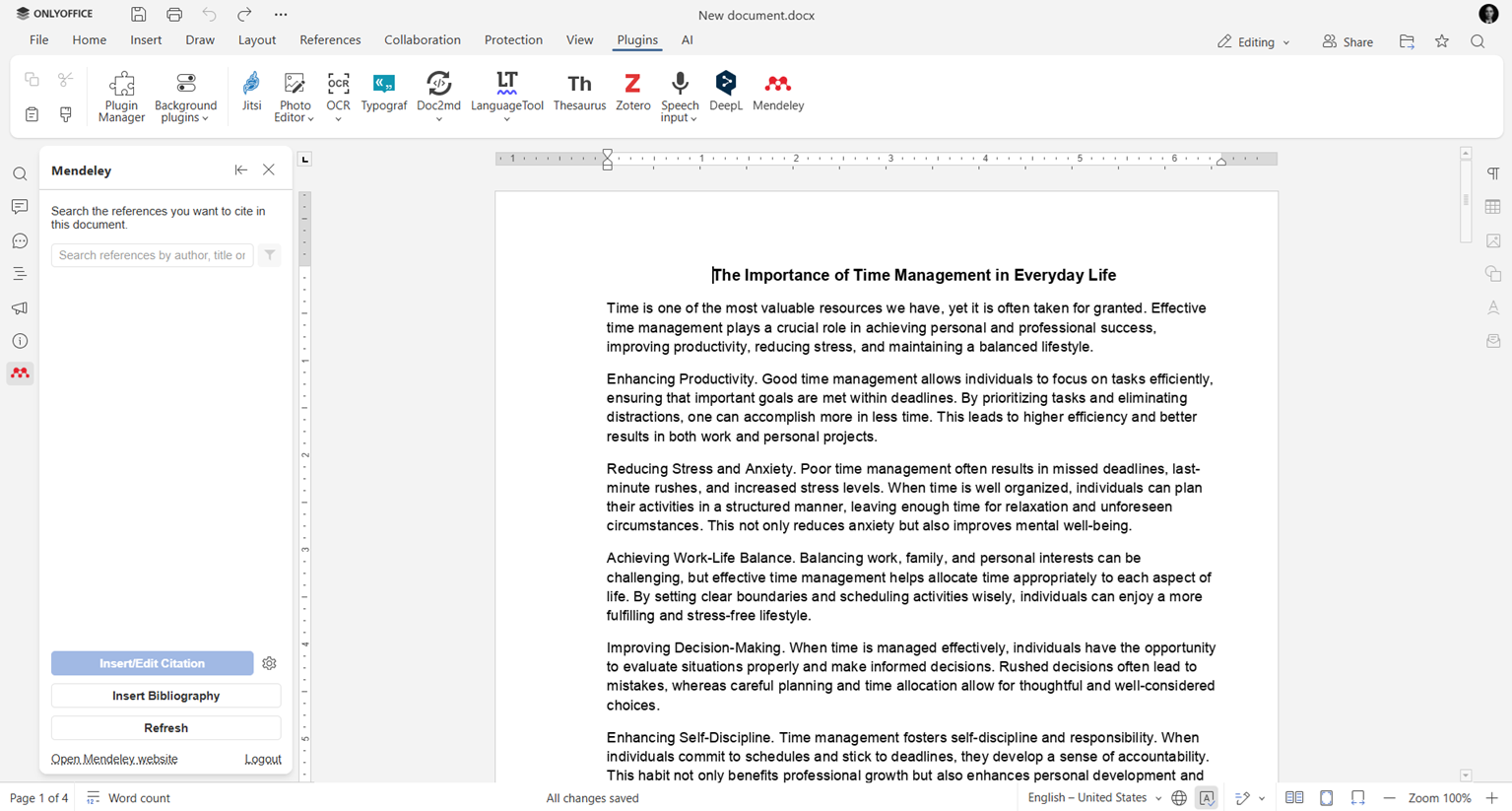
The plugin interface has been redesigned for a smoother citation-management experience. Navigation is clearer, and the most frequently used actions are easier to access, helping users spend less time adjusting references and more time writing.
Better Microsoft Word compatibility
This update also improves compatibility with Microsoft Word, one of the most frequently requested features. Citation formatting is now preserved more accurately when documents are exchanged between ONLYOFFICE and Word, reducing the need for manual adjustments during collaborative work.
Smarter citation workflows
The updated plugin gives users more control over citations directly inside the editor and simplifies many routine tasks that previously required manual editing.
Edit citations via the context menu
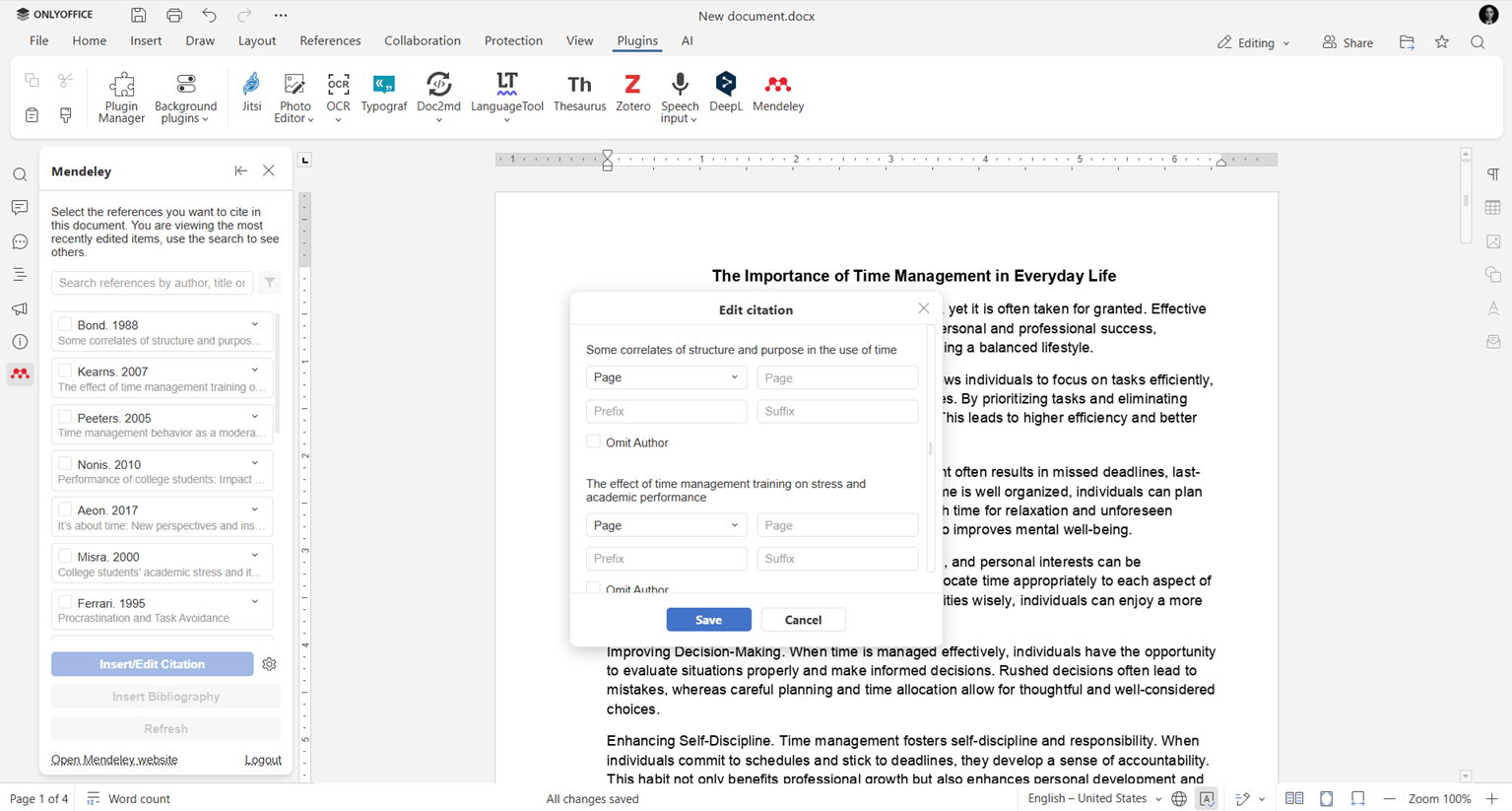
You can now edit citations directly from the context menu without reopening the full citation window each time. This makes quick edits much faster, especially in long research papers and academic documents with many references.
Where to find: right-click on a citation and choose Edit citation from the menu.
Prefixes, suffixes, and citation locators
Users can now add prefixes and suffixes to citations. This makes it easier to add contextual words such as see, cf., or short clarifications directly in citation settings instead of manually editing the document text.
Where to find: Insert/edit citations in the left-side toolbar
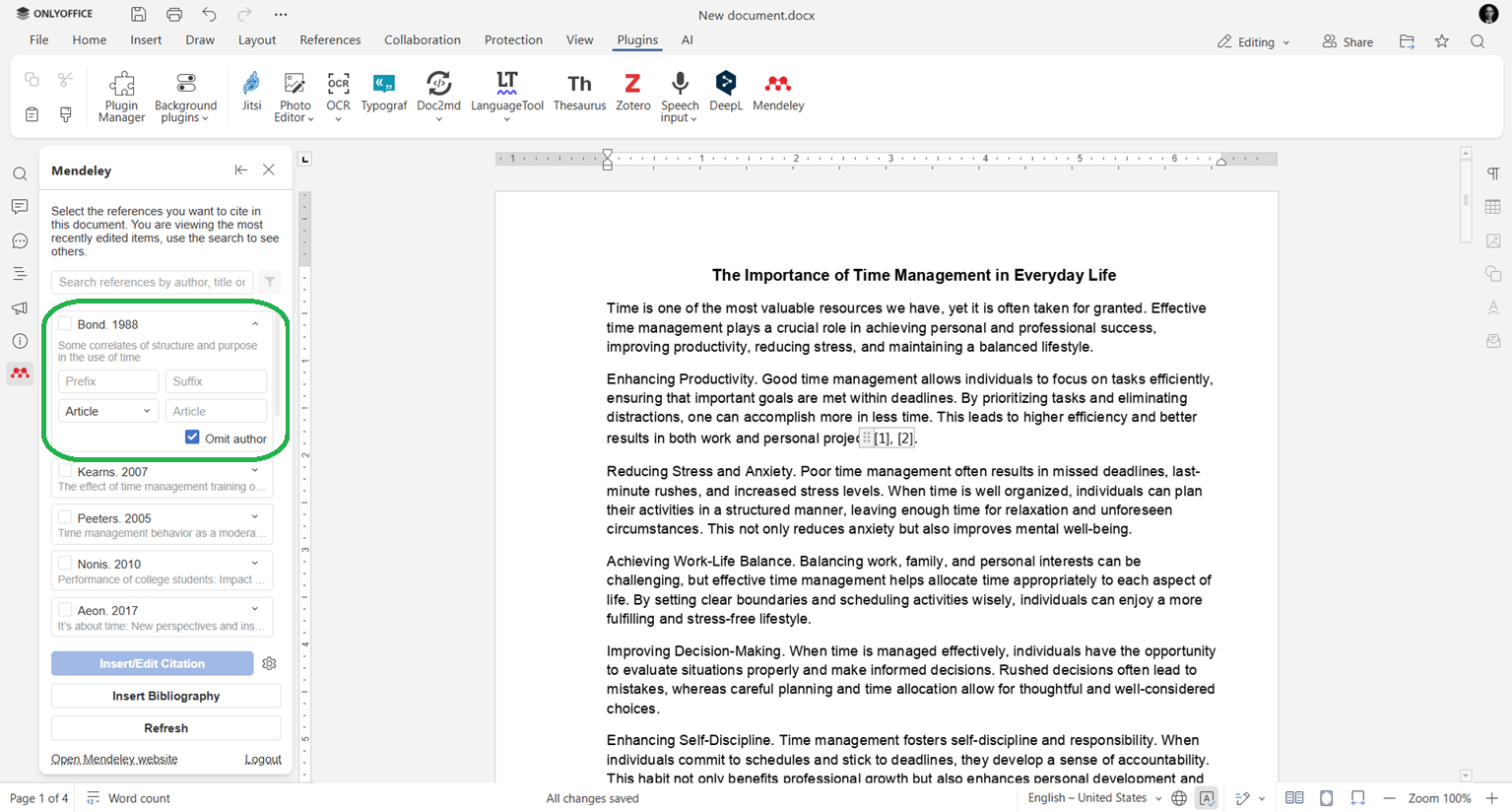
Citation locators are now supported as well. You can include:
- page numbers
- chapters
- sections
- paragraphs
- other location references
These improvements are especially useful for academic papers, legal documents, and research publications that require precise source references.
Omit Author support
The new Omit Author option allows you to hide the author name in citations when the author is already mentioned in the surrounding text. This helps keep references cleaner and more natural.
Better handling of repeated and manual citations
Repeated citations are now handled more accurately, including automatic Ibid. support for citation styles that require it. This helps reduce manual corrections when working with footnote-based styles. Manual citations are now handled more reliably, with better formatting preservation.
Improved support for citation styles
The plugin now offers expanded compatibility with citation formatting systems and more flexibility when working with styles.
Custom citation styles
Users can now upload their own citation styles, making it easier to comply with institutional, publisher, or journal-specific formatting requirements.
Where to find: Mendeley plugin panel → Settings → Style → Add custom style → import your .csl file.
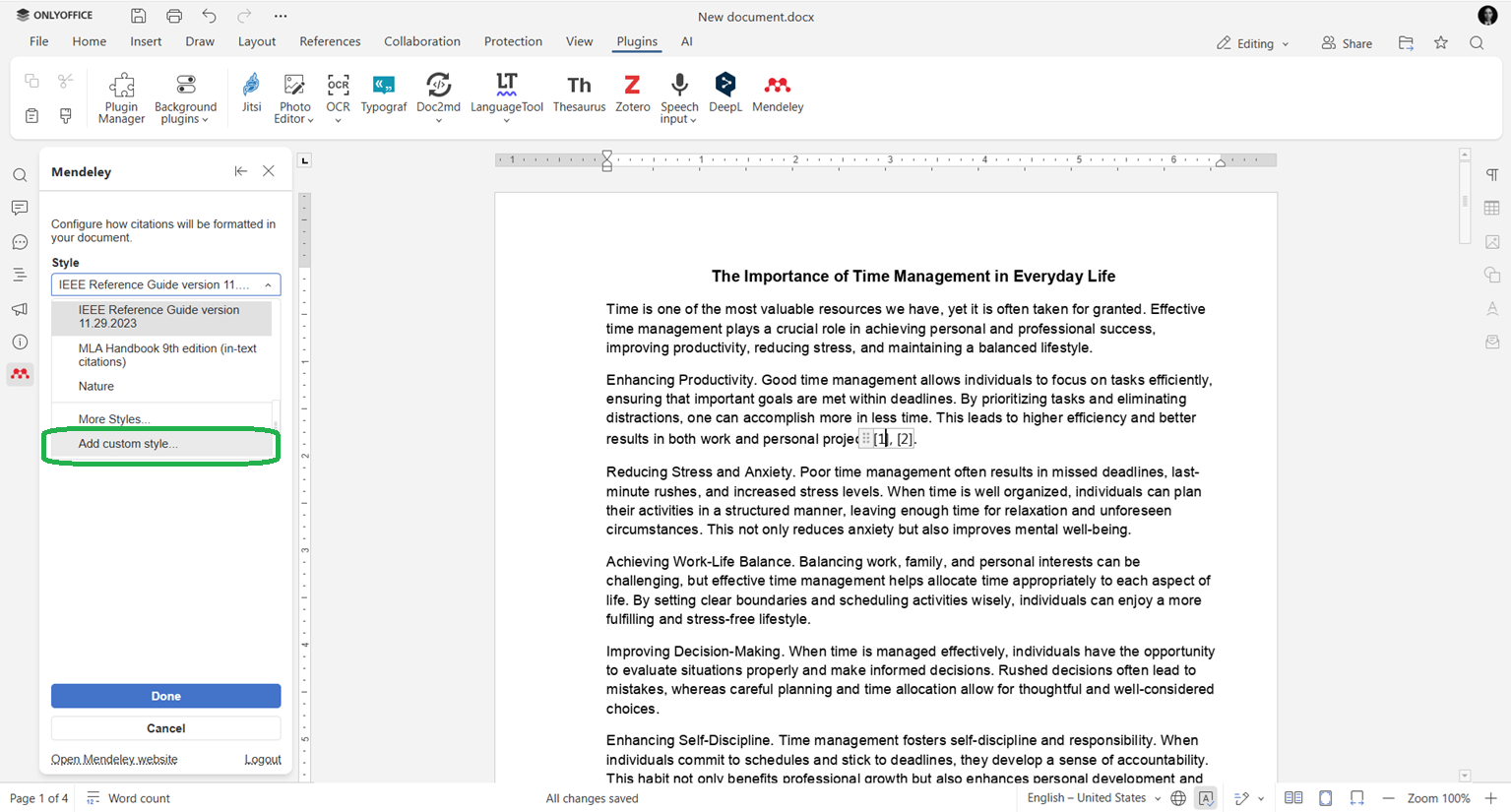
You can choose from thousands of additional styles available in citation style repositories.
The plugin also supports styles that inherit formatting behavior from parent styles, improving compatibility with more advanced CSL configurations.
In addition, the plugin now works better with citation styles that use footnotes and endnotes, helping users manage complex academic formatting with fewer manual adjustments.
Bibliography formatting
The plugin now includes additional bibliography formatting options, making it easier to keep reference lists clean and consistent across academic documents.
This helps users spend less time manually adjusting bibliography layouts and ensures references better match the requirements of universities, journals, and publishers.
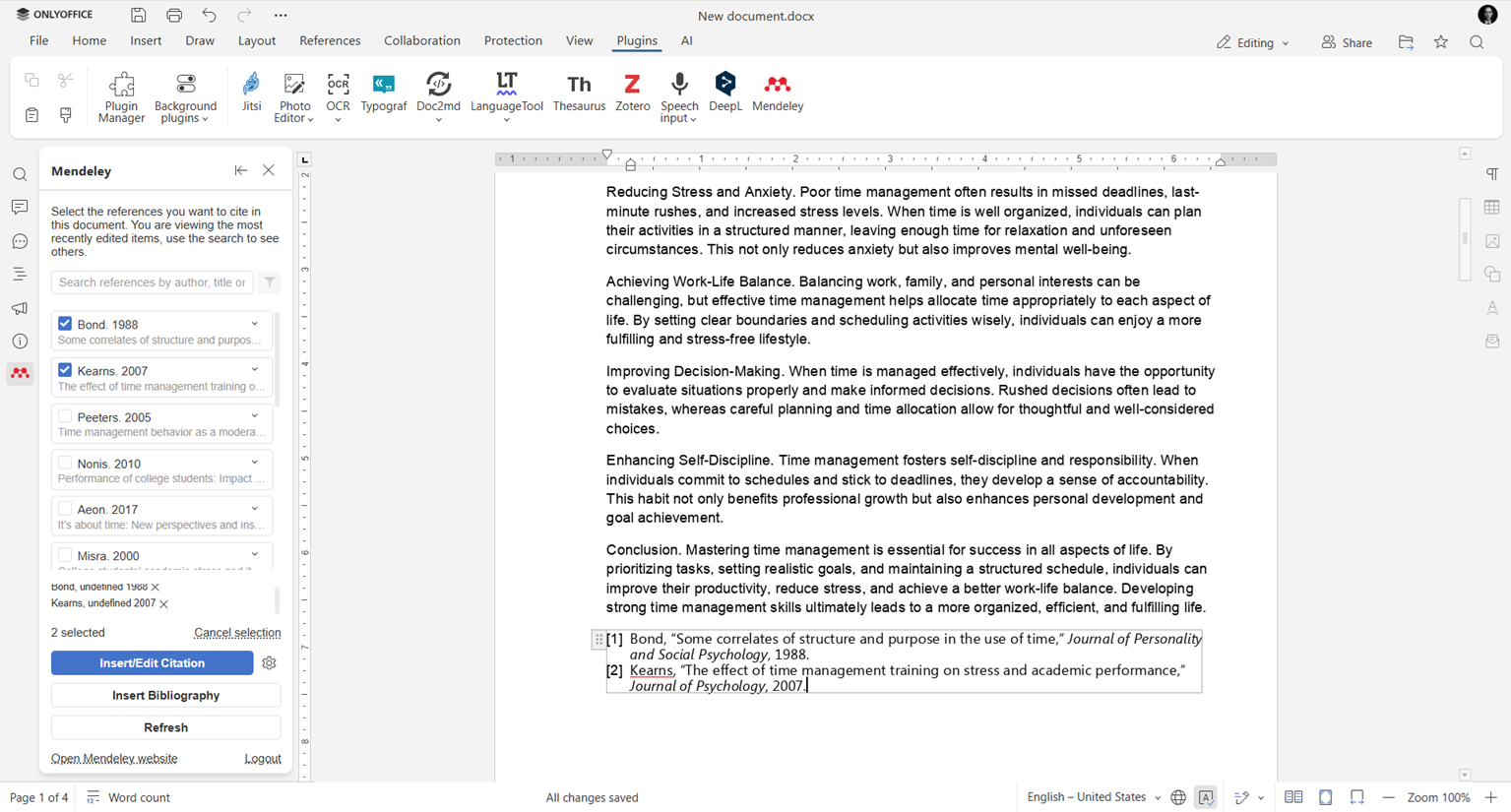
Get the updated Mendeley plugin
Update the Mendeley plugin in ONLYOFFICE editors to access the latest citation management tools, bibliography improvements, and expanded academic writing capabilities.
FAQ: Mendeley plugin for ONLYOFFICE
How can I get the updated plugin?
If you already use the Mendeley plugin in ONLYOFFICE editors, update it via the Plugin Manager in the Plugins tab. Or install it from the Plugin Marketplace in the editor.
In which ONLYOFFICE products is the Mendeley plugin available?
The Mendeley plugin is available in ONLYOFFICE DocSpace, ONLYOFFICE Workspace, and ONLYOFFICE Docs. The plugin doesn’t work in Desktop Editors.
Can I add my own citation styles?
Yes. The updated plugin supports custom CSL style uploads, allowing you to use citation formats required by universities, journals, publishers, or research institutions.
Is the Mendeley plugin free?
Yes. The plugin is completely free and available through the Plugin Manager in ONLYOFFICE editors.
Where can I send feedback or feature suggestions?
We’d love to hear your feedback. You can share ideas, report issues, or suggest improvements through the ONLYOFFICE community.
Useful links
Mendeley plugin for ONLYOFFICE
ONLYOFFICE Plugins Marketplace
Get ONLYOFFICE editors: cloud version / Desktop Editors
Create your free ONLYOFFICE account
View, edit and collaborate on docs, sheets, slides, forms, and PDF files online.