ONLYOFFICE Workspace v12.9.0: Stronger security and smoother everyday work
ONLYOFFICE Workspace v12.9.0 is here. This release puts security front and center, delivering important updates that help make your workspace safer, more reliable, and better aligned with today’s evolving security challenges.
You won’t find a new button or menu in this update. Most of the work happens behind the scenes, where it protects your sign-ins, your files, and your team’s collaboration. We’ve tightened security, fixed bugs that could disrupt your routine, and updated the building blocks that keep ONLYOFFICE Workspace running smoothly.
Let’s explore what’s new and what it means for you.
What’s new at a glance
- Stronger sign-in protection with a unique security key for every installation
- Important bug fixes for Google Drive dates, the editor logo, CRM, and more
- Updated components that close known security gaps
- More reliable background services for real-time updates, single sign-on, file previews, short links, and WebDAV
- New requirement: Node.js 24.22.1 or later
Please note: After this update, all users will need to sign in again due to new security improvements.
General portal improvements
A unique security key for every installation
When you sign in, open a confirmation link, or log in through Google, Facebook, or your company’s single sign-on (SSO), your portal creates a kind of digital pass. This pass, called an authentication token, proves who you are.
Previously, these passes were signed with a shared default key. Now, each ONLYOFFICE Workspace installation gets its own unique secret key.
What you need to do: Simply sign in again after the update. Your old passes won’t work with the new key, so a fresh login creates a new, more secure one.
Extra protection against tampered pages
We’ve also turned on a security check called ViewState MAC validation for portals running on Mono, the platform that runs ONLYOFFICE Workspace on Linux servers.
In plain terms, some web pages store small pieces of information while you work. This check confirms that nobody has secretly changed that information along the way. A unique key is created automatically the first time the portal starts, so there’s nothing for you to set up.
Tighter permissions in Docker
If your team runs ONLYOFFICE Workspace in Docker, this one’s for your administrator. The ONLYOFFICE service now has limited admin rights. It can only restart the specific services it needs, and nothing more.
This follows a simple security principle: give every part of the system only the access it truly needs. Fewer permissions mean fewer chances for something to go wrong.
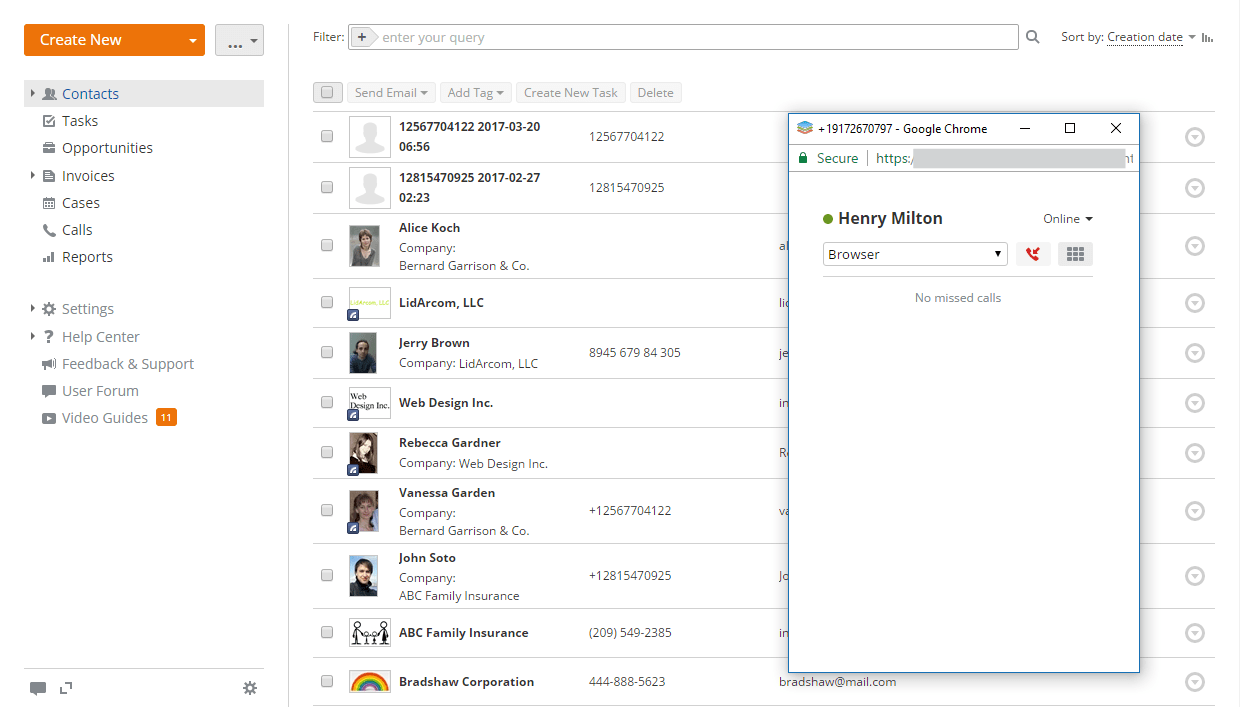
A safer CRM connection with Twilio
If you use Twilio for calls in the CRM module, this fix matters. Previously, the CRM could accept incoming messages from Twilio without checking that they were genuine. Now, every request must carry a valid signature. Fake or forged requests are simply rejected.
Correct dates for Google Drive files
Have you ever noticed odd dates on files from your connected Google Drive? On servers set to a time zone other than UTC, file and folder dates could appear shifted. That’s now fixed, so you’ll see the right dates every time.
The right logo in the editors
In newer versions of the document editor, the logo didn’t always display correctly. It now looks just as it should.
Smoother search setup
Your portal uses Elasticsearch to power full-text search, including searching inside attached files. The plugin that makes this possible is now installed only if it’s missing. That means no unnecessary reinstallations and a quicker, cleaner update process.
Dependency and package updates: why they matter to you
Like most modern software, ONLYOFFICE Workspace is built from many smaller components, often called packages. These handle tasks like storing files in the cloud, sending emails, connecting to Dropbox or Google, and verifying sign-ins.
Here’s why keeping them fresh is so important:
- They close security gaps. When a weakness is found in a component, it’s fixed in a newer version. Updating keeps those known weaknesses out of your workspace.
- They keep integrations working. Services like Google, Dropbox, Box, and Telegram change over time. Up-to-date packages help your connections keep running reliably.
- They improve stability. Newer versions often bring bug fixes and better performance.
In v12.9.0, we:
- Removed outdated components that had known vulnerabilities and replaced them with safer, actively maintained alternatives.
- Upgraded many key components to new major versions, including those used for sign-in security, cloud storage, notifications, and phone number handling.
- Refreshed other components within their current versions, covering areas like email, logging, and cloud services.
You don’t need to do anything special here. These improvements arrive automatically with the update and quietly make your workspace stronger.
 Photo by Growtika on Unsplash
Node.js services updates
Several helpful features in ONLYOFFICE Workspace run on small background services built with Node.js. In this release, we updated their components to fix vulnerabilities and removed older, outdated parts. We also fixed several issues you might have run into.
Important for administrators: Node.js 24.22.1 or later is now required for these services. Please check your server’s Node.js version before updating.
Real-time updates (Socket.IO)
This service powers live features, like instant notifications and updates that appear without refreshing the page.
Fixed: In some cases, after signing out and signing in as a different user, the connection could still remember the previous person. Now, the correct identity is always used. This is especially helpful on shared computers.
Improved: A database error no longer causes the service to crash, so your real-time features stay up and running.
Single sign-on (SsoAuth)
If your company signs in through a central login system, this one’s for you.
Fixed: Logging out from your company’s login system now works correctly, so signing out really signs you out.
Improved: When the portal downloads setup information from your login provider, it now accepts only standard web addresses, files up to 10 MB, and waits no longer than 30 seconds. This prevents slow or suspicious downloads.
File previews (Thumbnails)
This service creates the small preview images you see for your files and links.
Fixed:
- The preview tool now installs correctly on Node.js 24.
- Web addresses that include a port number (for example,
:8080) are no longer rejected.
Short links (UrlShortener)
Fixed: An error that could appear the very first time the service talked to the database after starting up. Short links now work right away.
File access (WebDav)
Fixed: Previously, if the server couldn’t deliver a file, the error message could be saved as if it were the file’s content. Now, the system clearly reports the problem instead. Your files stay accurate, and errors are easy to spot.
How to get started with v12.9.0
Updating is simple. Here’s a quick checklist to share with your administrator:
- Back up your portal data before you begin.
- Check the Node.js version on your server and make sure it’s 24.22.1 or later.
- Install the update using your usual method.
- Let your team know they’ll need to sign in again after the update.
That’s it! Once everyone signs back in, your workspace is running with all the latest protections in place.
Update today and work with confidence
ONLYOFFICE Workspace v12.9.0 is all about peace of mind. With stronger sign-in security, safer connections, and dozens of fixes behind the scenes, you and your team can focus on what matters most: getting work done together.
Ready to experience the improvements firsthand? Update your ONLYOFFICE Workspace to version 12.9.0 today and enjoy a safer, smoother experience. Check instructions in Help Center
Have questions about the update? Our team is always happy to help you get the most out of ONLYOFFICE.
Create your free ONLYOFFICE account
View, edit and collaborate on docs, sheets, slides, forms, and PDF files online.