Meet ONLYOFFICE DocSpace 3.6 with AI agents for a new level of intelligent assistance to your daily tasks
We are excited to announce the release of ONLYOFFICE DocSpace 3.6 that brings intelligent assistance to your workflow. This version introduces AI agents and includes over 20 platform enhancements designed to streamline your projects and boost productivity. Let’s explore what’s new and how you can leverage these features to transform the way you work.

Meet your new AI agents
The highlight of DocSpace 3.6 is the introduction of AI agents. This major enhancement brings a new level of intelligent assistance directly into your daily tasks, helping you work faster and more efficiently.
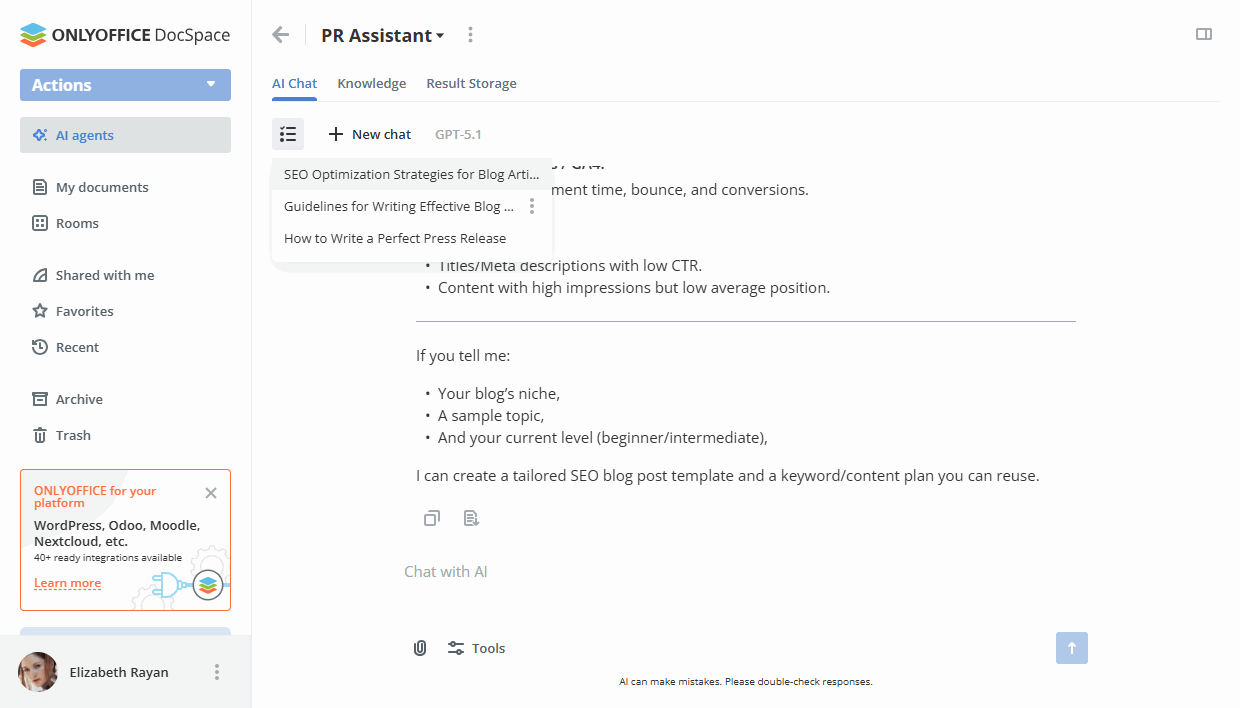
You can quickly set up an AI agent tailored to your specific needs. Once configured, you can interact with your AI assistant in a dedicated section. Simply ask questions or describe what you need, and the agent is ready to help.
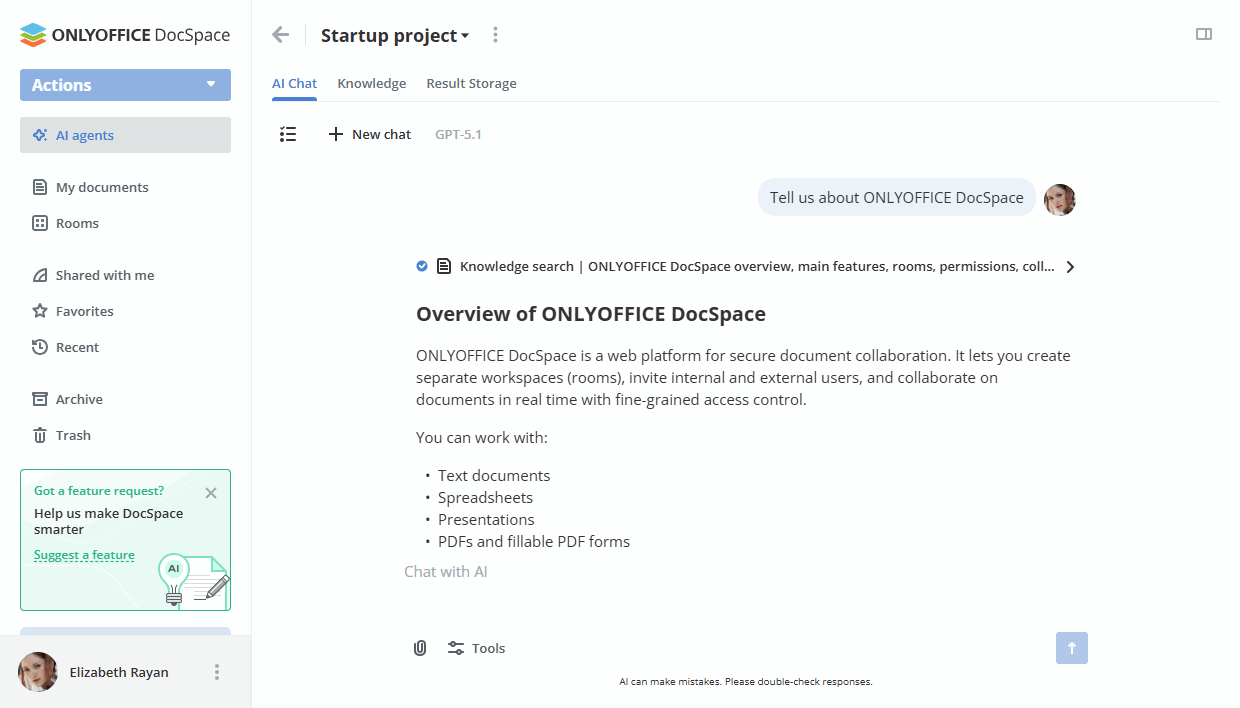
The AI can perform a wide range of tasks to support your projects:
- Analyze files: Dive deep into your documents to check for accuracy, suggest improvements, or summarize key points.
- Generate content: Create text, brainstorm ideas, or draft communications based on your prompts.
- Search for information: Look up information across the web and your own personalized knowledge base.
- Manage your DocSpace: Organize files, structure rooms, add users, and keep your workspace tidy and accessible.
- Invite teammates: Collaborate with your colleagues directly within the AI agent chat, enhancing teamwork with powerful, AI-driven tools.
Getting started with AI agents
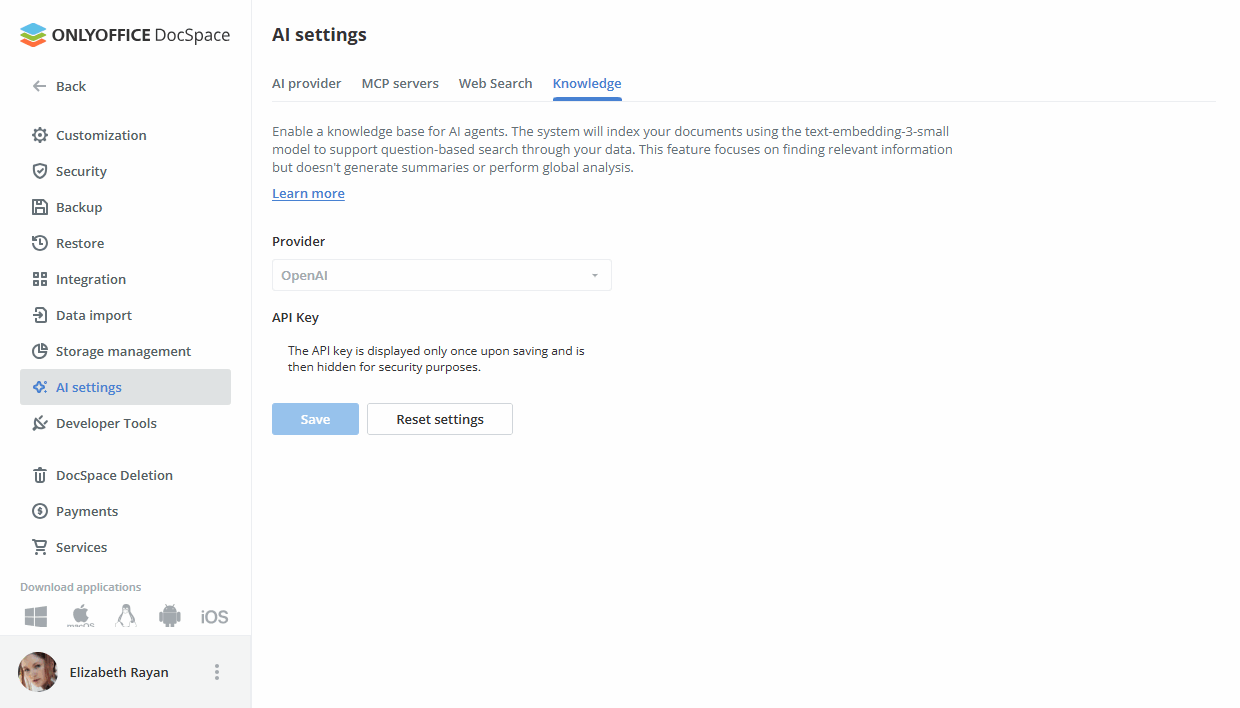
Enabling AI agents in your DocSpace is straightforward. The new AI Settings section is your central hub for managing all AI-related functionalities. Here’s a quick overview of how to get it all running.
1. Add an AI provider
You’ll need to connect an AI provider* to power your agents. Make sure you have an API key from your chosen provider, as this is essential for the connection.
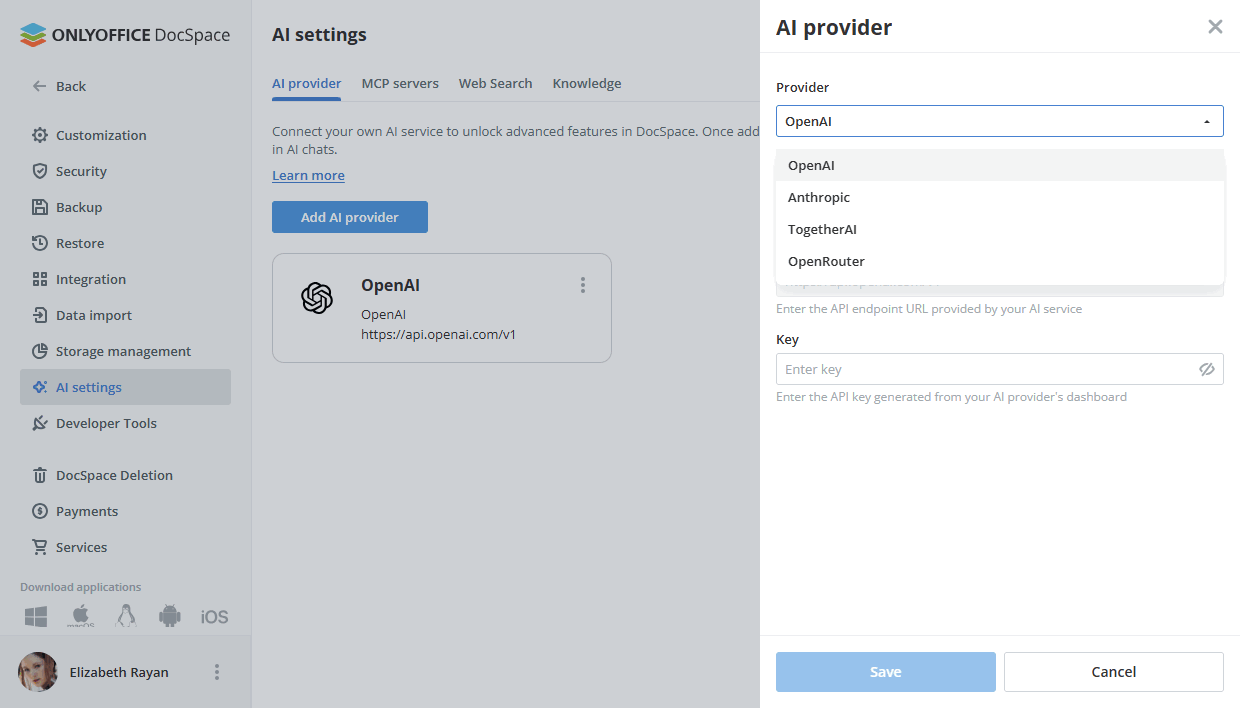
*Currently, the following providers are supported: OpenAI, Anthropic, TogetherAI, and OpenRouter. More options will be added in the future releases.
2. Enable MCP server
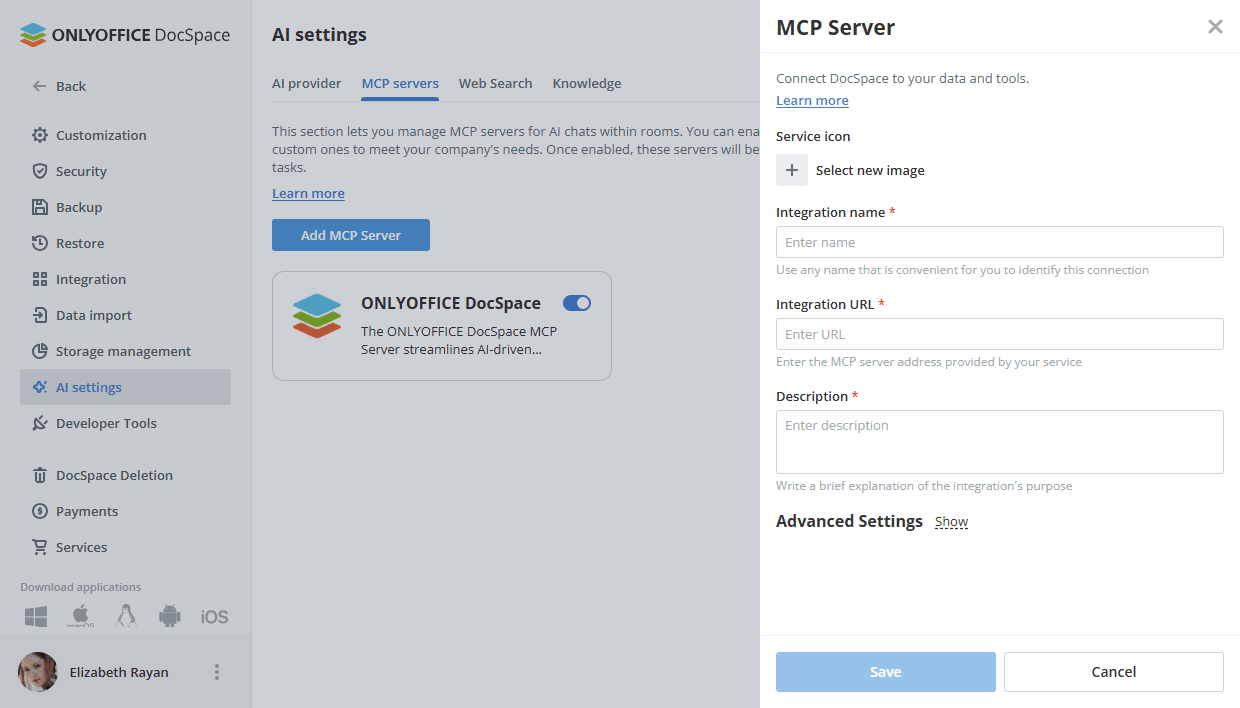
Next, enable the MCP server. You can activate the ready-to-use ONLYOFFICE DocSpace MCP Server, which empowers AI agents to interact with and manage various elements within your DocSpace, such as creating rooms or organizing files. Alternatively, you can connect any other MCP server to further enhance the capabilities.
3. Connect web search and knowledge base
To expand your AI’s capabilities, enable the web search engine. This allows the agent to pull information from the internet when needed. You should also activate the knowledge base. The system will index your documents, allowing the AI to perform intelligent, question-based searches through your own data.
4. Create your first agent
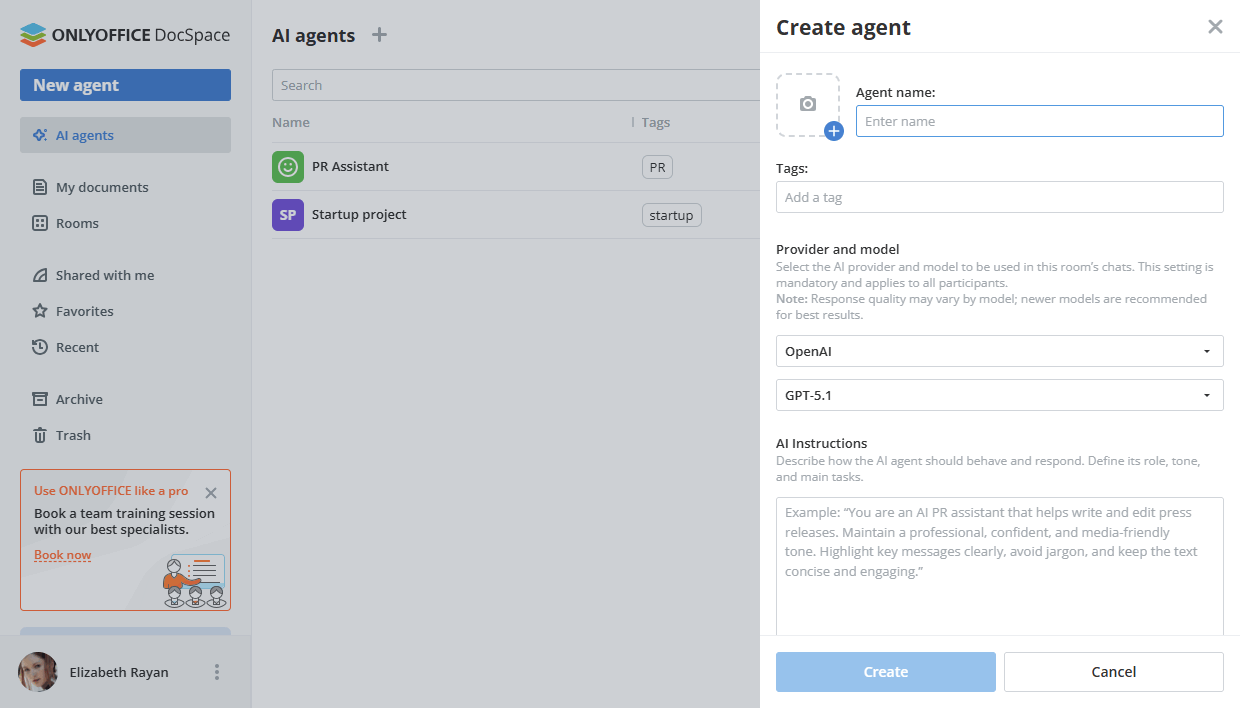
Once the setup is complete, go to the AI Agent section to build your first agent. Give it a name, cover, and tags. You can also provide specific instructions to define its purpose, such as, “Chats in this room are for discussing our startup project. Please stay on topic.”
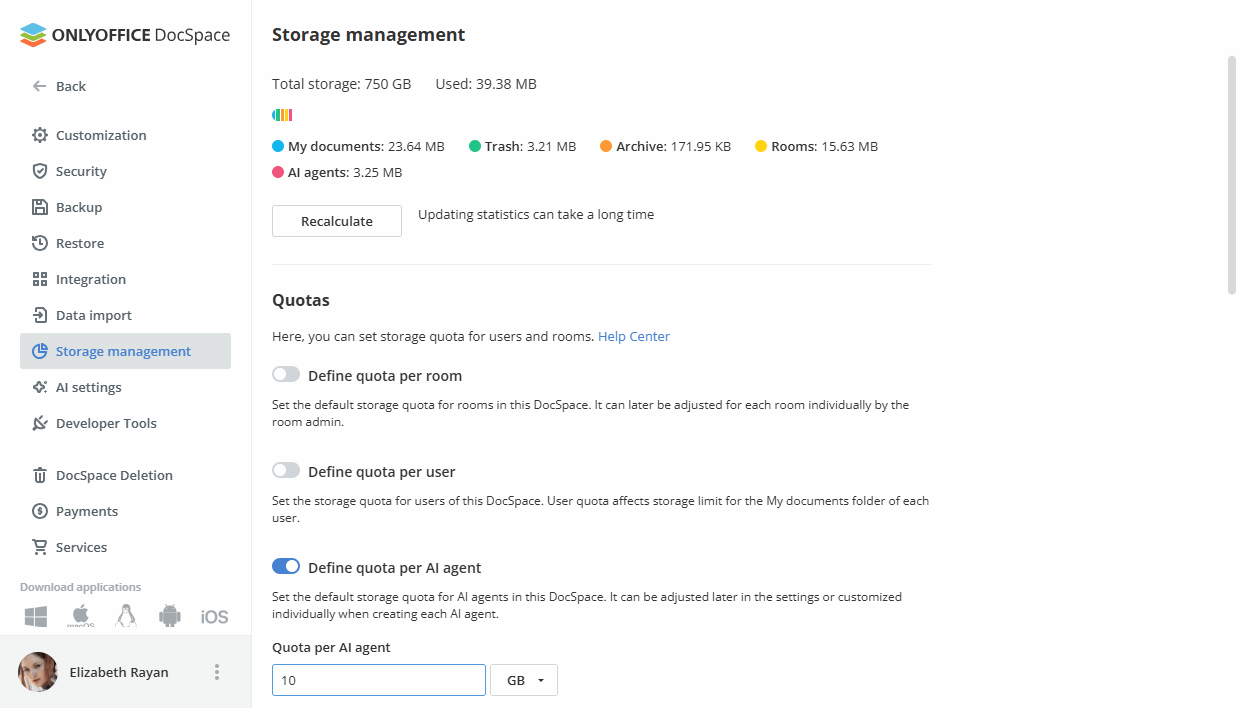
Additionally, you can set storage quotas for your AI agents, giving you better control over memory consumption within your DocSpace.
Where to find: Settings ➙ Storage management
5. Invite contacts
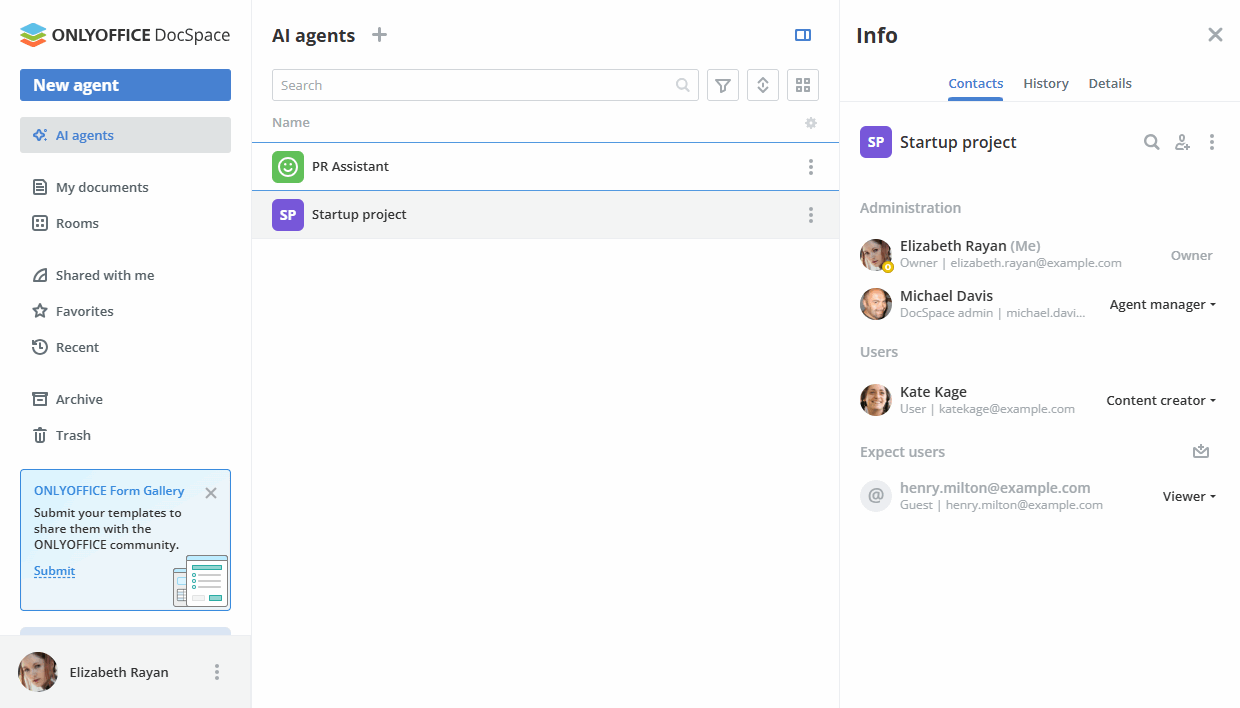
Invite your colleagues and other collaborators to your AI agent while assigning the appropriate access rights:
- Agent Managers have full control, including managing settings, inviting users, and overseeing the shared result space.
- Content Creators can edit files, upload knowledge base content, and view results but cannot manage users or settings.
- Viewers have read-only access to the shared result space, without access to the chat or knowledge base.
6. Enter and manage your prompts
Imagine you’re working on a new contract. You can ask the AI agent to analyze the document from your knowledge base, checking for grammatical errors and legal accuracy before sending it to a partner.
When the analysis is done, the file can be saved to the Result Storage, where you can continue editing it, collaborate with your team, or share it via a public link.
Need to revisit previous prompts or results? Simply access the Chat History at any time for a quick review.
Unlocking the potential of AI agents in DocSpace: Who benefits and how
Here are several engaging use cases for the AI agent in ONLYOFFICE DocSpace, showcasing how it can be a game-changer for various professionals across industries.
Legal teams: contract review and compliance
- How it helps: Legal professionals can use the AI agent to analyze contracts stored in the knowledge base, checking for grammatical errors, legal accuracy, and compliance with regulations. This ensures documents are polished and error-free before being shared with clients or partners.
- Scenario: A lawyer uploads a draft contract, asks the AI to highlight ambiguous clauses, and receives suggestions for improvement. The final version is saved in the Result Storage for team collaboration.
Project managers: streamlining team collaboration
- How it helps: Project managers can use the AI agent to organize project files, create new rooms for specific tasks, and generate summaries of meeting notes or project updates.
- Scenario: A manager asks the AI to summarize a lengthy project report into key action points, which are then shared with the team for quick decision-making.
Educators: lesson plan creation
- How it helps: Teachers can leverage the AI agent to create engaging lesson plans, generate quizzes, or summarize educational materials for students.
- Scenario: An educator uploads a textbook chapter and asks the AI to create a quiz based on the content, saving hours of manual work.
Marketing teams: content creation and analysis
- How it helps: Marketers can use the AI agent to brainstorm ideas, generate social media posts, or analyze campaign performance data stored in the knowledge base.
- Scenario: A marketer asks the AI to draft a series of tweets promoting a new product, then refines the content collaboratively with the team.
HR departments: policy drafting and feedback
- How it helps: HR professionals can draft company policies, analyze employee feedback, and create onboarding documents with the AI agent’s assistance.
- Scenario: An HR manager uploads employee survey results and asks the AI to identify key trends and suggest actionable improvements.
Sales teams: proposal and presentation creation
- How it helps: Sales teams can use the AI agent to draft client proposals, create presentations, and analyze customer data for insights.
- Scenario: A salesperson asks the AI to generate a tailored proposal for a client based on their preferences and past interactions stored in the knowledge base.
Researchers: data analysis and summarization
- How it helps: Researchers can analyze large datasets, summarize research papers, and generate reports with the AI agent’s help.
- Scenario: A researcher uploads multiple articles and asks the AI to extract key findings and compile them into a concise report.
Event planners: task management and communication
- How it helps: Event planners can organize schedules, create task lists, and communicate with vendors using the AI agent.
- Scenario: An event planner asks the AI to draft a detailed timeline for an upcoming conference, including vendor deadlines and team responsibilities.
Customer support teams: knowledge base optimization
- How it helps: Support teams can use the AI agent to analyze customer queries, improve FAQ documents, and generate quick responses.
- Scenario: A support agent asks the AI to review common customer questions and suggest updates to the FAQ section for better clarity.
Freelancers: productivity and organization
- How it helps: Freelancers can manage their projects, generate invoices, and organize client files with the AI agent’s assistance.
- Scenario: A freelancer asks the AI to draft an invoice template and organize project files into specific folders for easy access.
More than just AI: further improvements
While AI agents are the main event, DocSpace 3.6 is packed with lots of enhancements to improve your experience.
- The latest version of the editors: With AI-powered spell and grammar checks, customizable hotkeys, macro recording, and more.
- Redesigned Data Import: We’ve overhauled the data import tool for a smoother and more intuitive experience when migrating your files.
- New format support: DocSpace now supports the HML format and allows you to convert presentations to TXT files.
- Uploading empty files: For added flexibility, you now have the option to upload empty files to structure your projects from the ground up.
- Facebook and Telegram integrations: Now available for the Startup plan, expanding your communication and collaboration options.
- Enhanced “Shared with me” section: Includes a new Shared by column and filter (the latter is not accessible to Users and Guests).
How to use new features
Watch our free detailed webinar to learn how to work with the new features:
Get ONLYOFFICE DocSpace 3.6
The latest update is already available in the cloud. Sign into your DocSpace to try all the new features yourself, or create a free account if you are new to ONLYOFFICE DocSpace.
For the self-hosted builds, the new version will be available a bit later. Stay tuned!
Shape the future of ONLYOFFICE with your ideas!
Share your thoughts, suggestions, and ideas on how we can improve our solutions and make your experience even better. Your input matters, so don’t hesitate to visit the platform and leave your suggestions today!
Create your free ONLYOFFICE account
View, edit and collaborate on docs, sheets, slides, forms, and PDF files online.