Introducing the Bergamot plugin for ONLYOFFICE: offline AI-based translation for your documents
Are you looking for a reliable translation tool for your documents that can work offline without connecting to external services? If this is the case, the new Bergamot plugin for the ONLYOFFICE editors is what you need.

About the plugin
Bergamot is a translation plugin for ONLYOFFICE based on Project Bergamot, an initiative that brings neural machine translation (NMT) to the client side (i.e., in the browser/on-device) instead of sending text to a cloud translation provider.
In practical terms, the plugin adds a translation tool to the ONLYOFFICE editors so you can translate selected text from one language to another without relying on third‑party web services for every translation request. It’s designed for users and organizations that want a convenient translation workflow inside the document editor while putting privacy and data control first.
Interesting fact: the Bergamot plugin was entirely developed and tested with Claude AI; no code snippet was written manually.
Key benefits
- More privacy-friendly translation. Since the Bergamot approach is focused on local/client-side translation, it reduces the need to send document text to external translation APIs. This is especially valuable for confidential documents.
- Instant translation without breaking your workflow. No copy/paste into separate tools. You translate where you write and edit, which saves time and keeps formatting and context close at hand.
- Multi-language support. The Bergamot plugin is compatible with many European languages, including English, German, Spanish, French, Italian, Portuguese, Polish, Dutch and more.
- Offline work. The plugin works offline, and no Internet connection is needed for continuous translation. When you launch it for the first time, it downloads the translation engine (WASM) and selected language models, which are cached in your browser for offline use.
How to use the Bergamot plugin
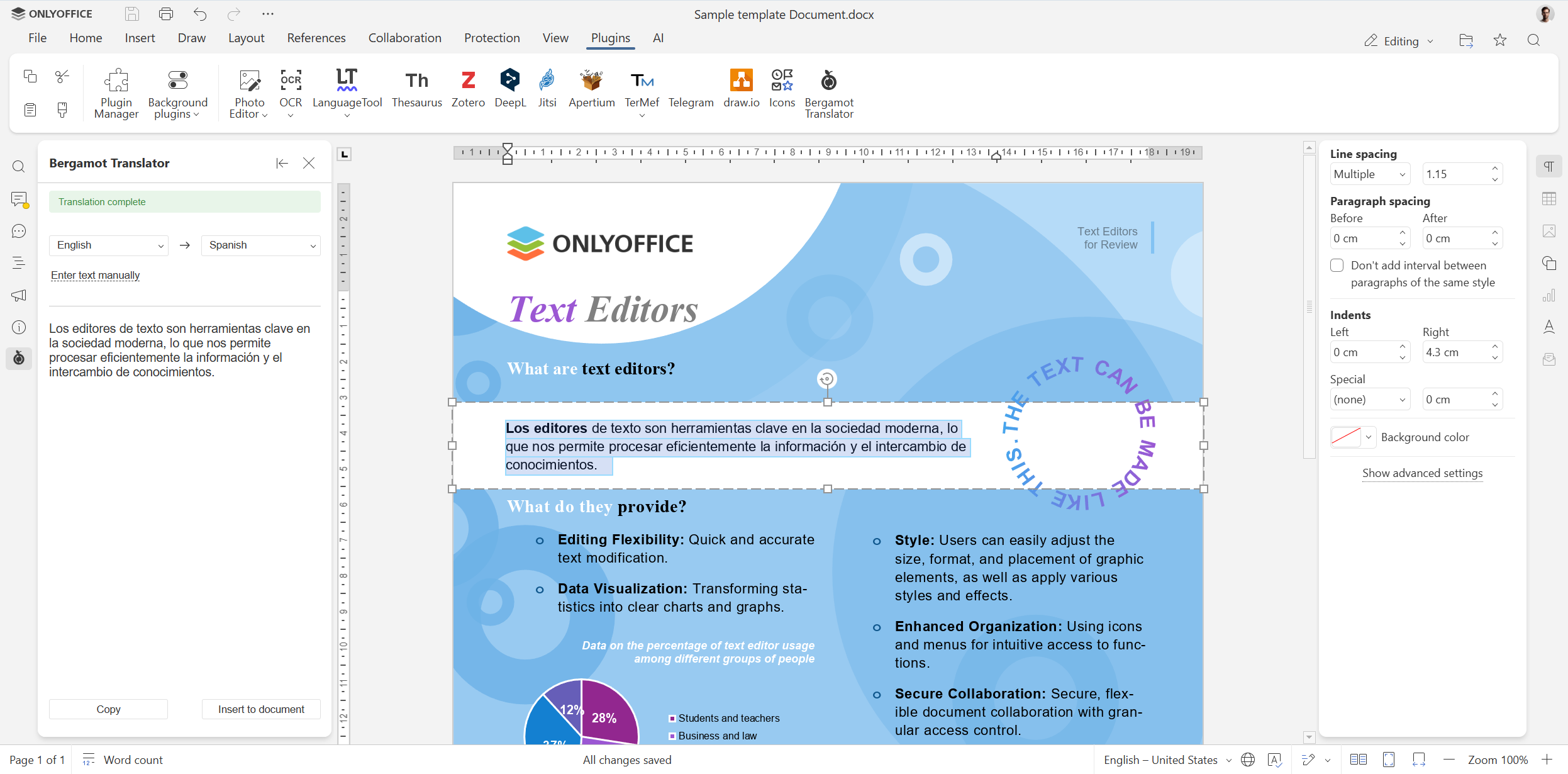
To translate something with Bergamot, simply follow these steps:
- Open your document, spreadsheet, presentation or PDF file and select the text you want to translate.
- Access the Plugins panel and launch Bergamot Translator.
- Choose the source and target languages.
- After the text is translated, click Insert to document to replace the selected text with the translation or click Copy to copy the translation to the clipboard.
How to install the Bergamot plugin
Installation is quite simple and straightforward: you add the Bergamot translation tool through the ONLYOFFICE Plugin Manager:
- Open your file in the ONLYOFFICE editors.
- Go to the Plugins tab and click Plugin Manager.
- Find Bergamot in the list.
- Click Install and close the Manager.
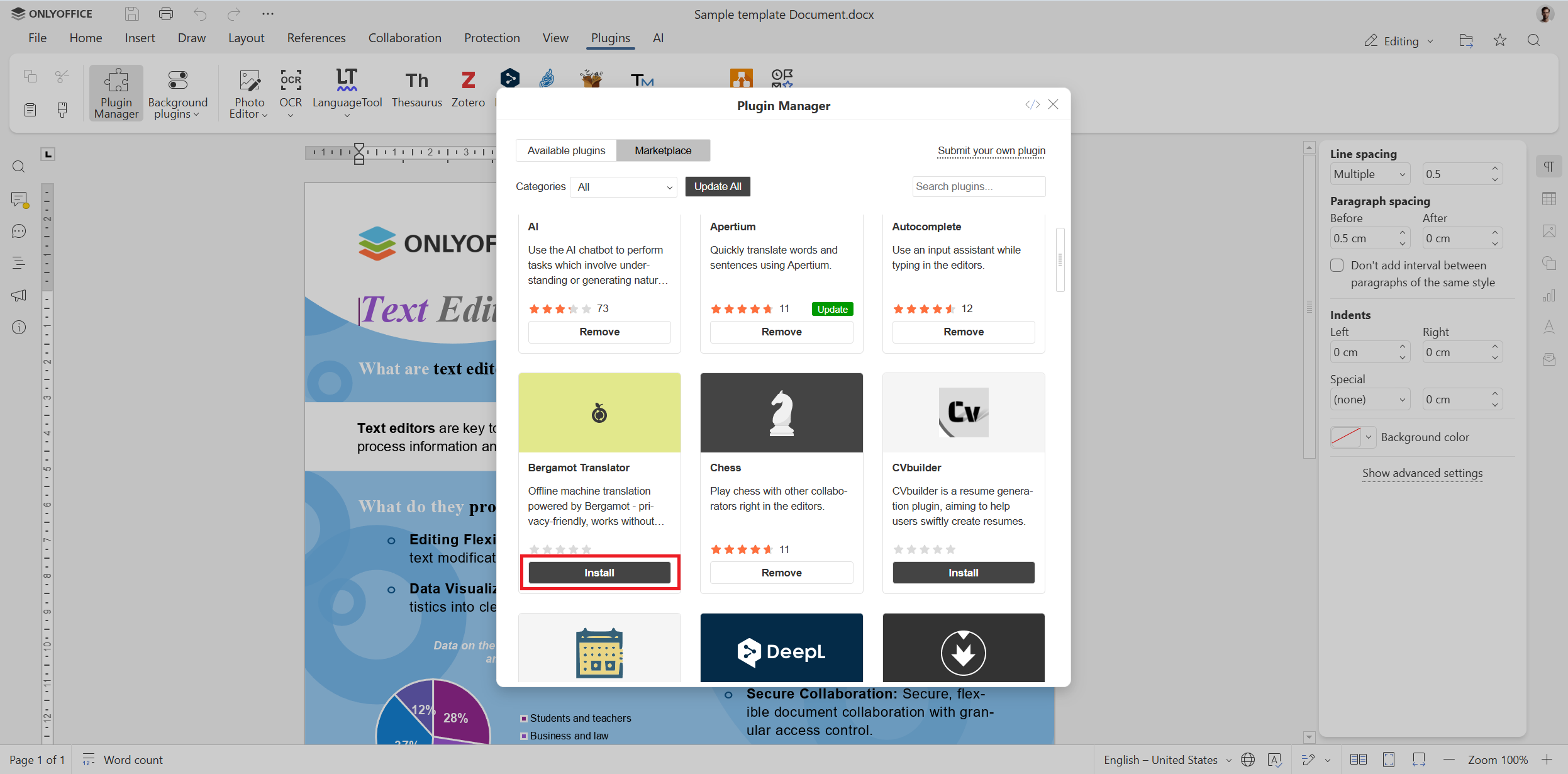
The Bergamot icon will appear on the Plugins tab.
Get ONLYOFFICE and translate documents with ease
Translate documents privately in your browser by creating a free ONLYOFFICE DocSpace account or download the free desktop app for offline translation on Windows, Linux and macOS:
We encourage developers to create their own plugins for the ONLYOFFICE editors. If you want to create one, please refer to this guide in our API documentation.
If you already have an add-on that can be a good fit for ONLYOFFICE and want it to be featured on our marketplace, please contact us at marketing@onlyoffice.com.
FAQ: Bergamot plugin for ONLYOFFICE
Is the Bergamot plugin free?
Yes, it is free and doesn’t include any hidden costs.
What AI technology lies behind this translation tool?
It is powered by the Bergamot neural machine translation engine.
Does it work offline?
Yes, it does. You only need an Internet connection to download the translation engine and language models. Once downloaded, they are cached locally and work fully offline.
Does Bergamot share my data with external providers?
No, it doesn’t. All translation happens locally in your browser or the ONLYOFFICE desktop app.
How do I uninstall the Bergamot plugin?
You can uninstall it via the Plugin Manager.
Useful links
Bergamot plugin: Marketplace / GitHub
New plugins for ONLYOFFICE: News / Date Picker / Text Highlighter / Icons
Alternative translation add-ons: Apertium / DeepL / Translator
Create your free ONLYOFFICE account
View, edit and collaborate on docs, sheets, slides, forms, and PDF files online.


