ONLYOFFICE DocSpace 3.7: Self-hosted builds are here with a lightweight install, ARM Docker, AI and license update
Summary
ONLYOFFICE DocSpace 3.7 introduces self-hosted builds that simplify deployment with a lightweight single-container install, ARM-optimized Docker support, and clearer licensing terms. This update enhances user experience by making it easier to evaluate and deploy DocSpace, while ensuring compliance with licensing requirements.
- Lightweight installation is ideal for trials and demos.
- ARM-optimized Docker improves performance on ARM devices.
- Licensing updates clarify usage and modification rights.
- Full multi-container setup is available for production use.
With ONLYOFFICE DocSpace 3.7, self-hosted users get a simpler deployment experience with a lightweight single-container install, ARM-optimized Docker support, and clearer licensing terms. Let’s break down what each of these means for your self-hosted setup.
What’s new in DocSpace 3.7
- File generation in the AI agent chats*
- Syncing a default AI provider from DocSpace to the editors*
- New providers: DeepSeek, Google AI, xAI
- Database connection for storing form responses
- Creating and editing forms in Form filling rooms
- Room grouping
- Easier room tag management
- Unified Billing section
- Multiple quality-of-life improvements
Check the full list of updates
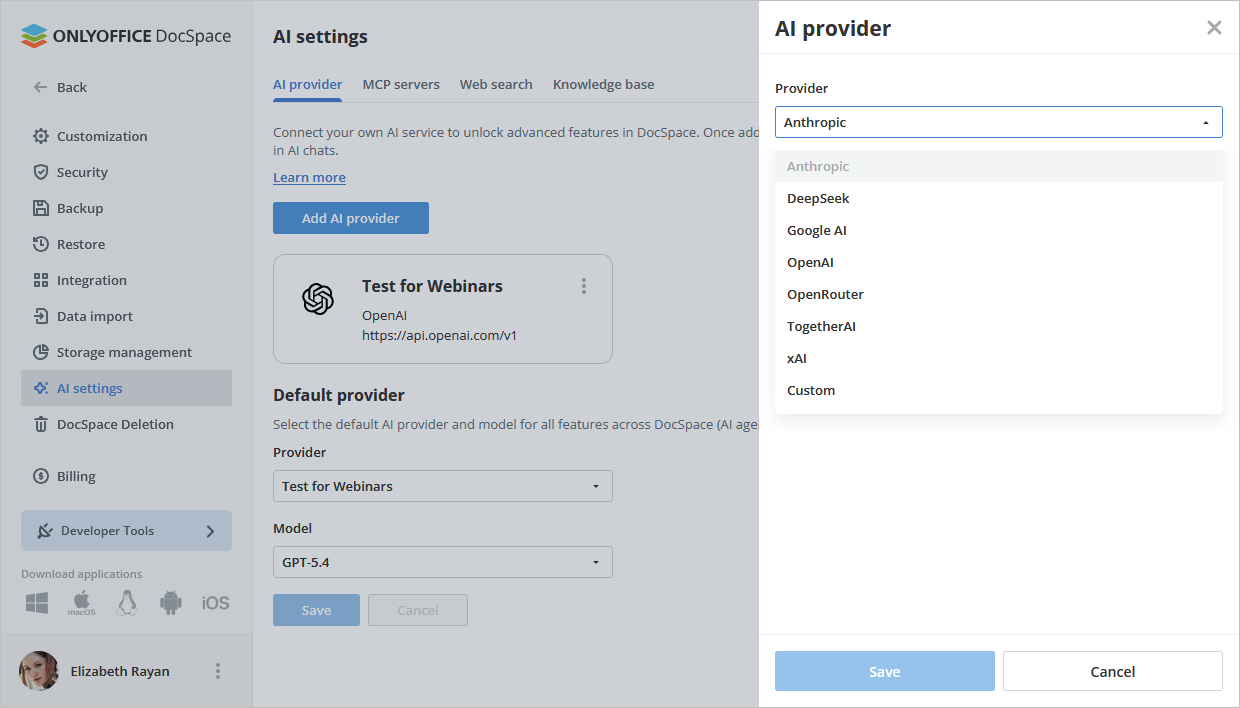
*Automation API is required and is currently available on request. Contact sales
The new lightweight installation option
Until now, installing DocSpace on a server with Docker meant pulling a large number of containers. For anyone who just wants to evaluate the platform, that’s a heavy lift.
DocSpace 3.7 introduces a lightweight build that is intended for quick evaluation and testing. Unlike the standard multi-container deployment, it combines all ONLYOFFICE DocSpace services into a single container and does not support thumbnail generation. Check instructions in Help Center
Choosing between lightweight and production setups
The lightweight container doesn’t replace the full deployment, it sits alongside it. You pick the option that matches your needs.
- Lightweight (single container): Best for trials, quick demos, and evaluation environments.
- Full multi-container setup: Best for production.
The simplified deployment stack consists of four containers:
- onlyoffice-docspace – all ONLYOFFICE DocSpace services (consolidated);
- onlyoffice-document-server – ONLYOFFICE online editors;
- onlyoffice-mysql-server – the MySQL database;
- onlyoffice-opensearch – the OpenSearch service;
The takeaway here is straightforward: you skip the burden of installing many separate, resource-heavy containers. For most people who want to try DocSpace on a server, that’s a genuine relief.
ARM-optimized Docker build
Hardware diversity keeps growing, and ARM-based servers and devices are now common in data centers, edge deployments, and developer machines.
DocSpace 3.7 adds an ARM-optimized version for Docker. If you’re running on ARM architecture, you no longer have to work around compatibility issues or rely on emulation. The build is tuned for your platform, which means smoother installation and better performance on ARM hardware.
For self-hosted teams standardizing on ARM, this opens up DocSpace as a native option rather than a workaround.
The Docker ARM version is installed the same way as the standard Docker build. The only requirement is an ARM-based server. You can also download it from Docker Hub.
License updates: clearer terms for self-hosted users
If you run open-source software on your own infrastructure, licensing clarity matters. DocSpace 3.7 updates the licensing terms for added clarity and compliance.
Here’s how it works:
- The software code is licensed under the GNU Affero General Public License v3.0 (AGPLv3).
- Additional terms must be included in all copies and distributions.
What the additional terms require
These terms focus on three practical points:
- Attribution and copyright notices: Keep proper attribution and copyright notices intact.
- Labeling modified versions: Clearly mark any version you’ve modified, so users know it differs from the original.
- No trademark rights: The license lets you modify the code, but it does not grant rights to use ONLYOFFICE trademarks. Those are covered by a separate Trademark Policy.
In plain language: you’re free to use and modify the code under AGPLv3, as long as you credit the source, label your changes, and leave the ONLYOFFICE branding alone unless you have separate permission.
Common concerns, addressed
“Is the lightweight version a stripped-down product?” No. The core DocSpace functionality inside the single container remains intact.
“Will I outgrow the single-container setup?” Possibly, and that’s fine. When you’re ready for production at scale, move to the multi-container deployment.
“Do the license changes restrict how I use DocSpace?” They clarify, rather than restrict, your existing freedoms under AGPLv3. The main additions are about attribution, labeling modifications, and respecting trademarks.
Create your free ONLYOFFICE account
View, edit and collaborate on docs, sheets, slides, forms, and PDF files online.


