ONLYOFFICE integration for Alfresco Content App v1.0.0 released: enable collaborative document editing
Summary
The newly released ONLYOFFICE integration for Alfresco Content App v1.0.0 enables collaborative document editing by allowing users to create, edit, convert, and co-author documents directly within the ACA interface. This integration supports real-time collaboration, version history tracking, and document permissions management, enhancing the overall user experience and workflow efficiency in Alfresco.
- Users can collaborate in real time with colleagues.
- Document version history helps maintain transparency.
- New office files can be created directly in ACA.
- Permissions can be managed within the editing interface.
- The integration simplifies content creation and review processes.
Working with office documents in Alfresco Content App just got easier. The new ONLYOFFICE integration brings document editing and collaboration directly to ACA, allowing users to create, edit, convert, and co-author files without leaving the interface.
While the existing ONLYOFFICE connector is designed for Alfresco Share, this new integration targets Alfresco Content App, extending document editing and collaboration capabilities to Alfresco’s modern Angular-based interface.
Key features
Real-time collaborative editing. Open documents directly from Alfresco Content App and collaborate with colleagues in real time using ONLYOFFICE Docs. Multiple users can work on the same file simultaneously in Fast or Strict mode, leave comments, review changes, and discuss in chat.
Version history. Open a document’s version history in the editor interface and track changes made over time, helping teams maintain transparency and document integrity.
New office file creation. Create new DOCX, XLSX, PPTX, and PDF forms and files right from the ACA interface.
File conversion. Convert files originating from different office suites and document standards to OOXML formats for further editing. Export files to various formats according to your workflow requirements*.
Document permissions. Control permissions directly within the editors, making it easier to control who can view, edit, or review a document.
Note: Supported file formats depend on the backend configuration provided by the ONLYOFFICE integration for Alfresco. The exact list of available formats for editing, viewing, conversion, and export may vary depending on the installed version.
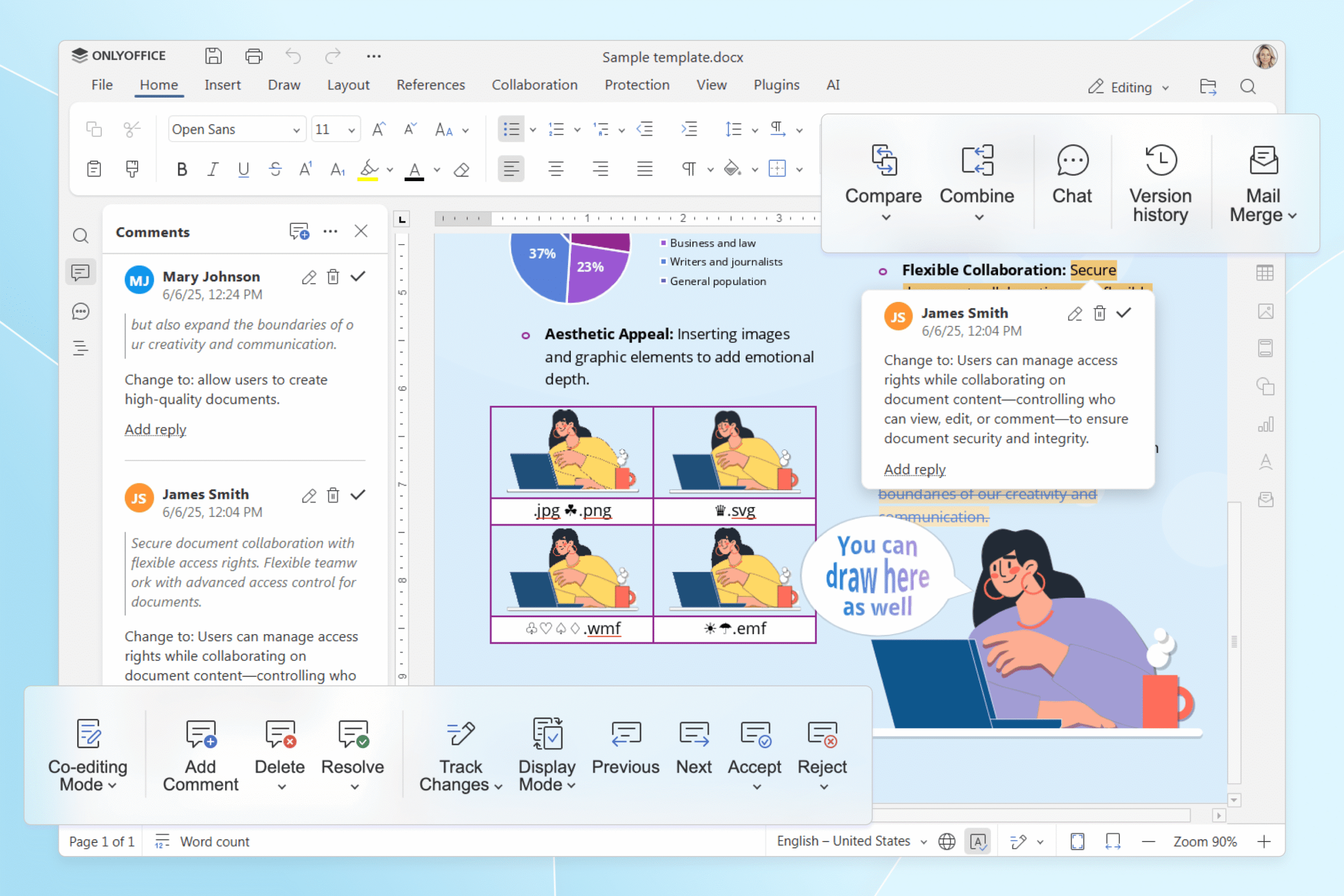
The integration also supports several advanced editor actions, including:
- inserting images from Alfresco;
- attaching files for mail merge operations;
- selecting documents for comparison;
- Using plugins for extra functions;
- inserting data from external links;
- navigating from the editor directly to the folder containing the current file;
- creating new documents from within the editor interface.
Benefits for Alfresco users
With ONLYOFFICE embedded directly into Alfresco Content App, teams can:
- work with office documents in a familiar environment;
- spend less time switching between applications;
- improve collaboration across departments;
- maintain document security and version control;
- simplify content creation and review processes.
Whether you’re reviewing contracts, preparing reports, or updating project documentation, you can handle the entire workflow directly in Alfresco Content App.
How to install
Before installing, make sure you have:
- Alfresco Content Services — the Alfresco repository backend
- Alfresco Content App (ACA) — the host Angular application
- ONLYOFFICE module package for Alfresco ≥ 8.3.0
- ONLYOFFICE Docs (Community, Enterprise, or Cloud).
The ONLYOFFICE integration for Alfresco Content App is distributed as an extension package and can be installed in your ACA environment.
1. Install the extension package:
npm install @onlyoffice/alfresco-extension
2. Register the extension in your ACA project.
3. Run the application:
npm run start
For detailed installation and configuration instructions, refer to the project documentation.
How to get started
After installation, new ONLYOFFICE actions become available directly in the Alfresco Content App.
To edit a document, right-click a supported file and choose Edit in ONLYOFFICE to open the editor.
Click View in ONLYOFFICE to open a read-only preview without downloading the file.
Use the Create in ONLYOFFICE option to generate a new file. Select the type of document you want: text document, spreadsheet, presentation, or PDF form.
To convert a file to OOXML format, select the file and click Convert in ONLYOFFICE.
To export a file, use Download As and choose the format without leaving Alfresco Content App.
Try ONLYOFFICE for Alfresco Content App
Try the new ACA integration or connect ONLYOFFICE Docs to your Alfresco environment to create, edit, convert, and collaborate on office documents.
FAQ: ONLYOFFICE connector for Alfresco Content App
What can I do with the ONLYOFFICE integration in Alfresco Content App?
The integration allows you to open, create, edit, and convert office documents directly within Alfresco Content App. You can also:
- collaborate with colleagues in real time
- leave comments and review changes
- create new text documents, spreadsheets, presentations, and PDF forms
- convert documents between supported formats
- manage document permissions
- access version history
- export files in different formats
Do I need ONLYOFFICE Docs to use this integration?
Yes. The integration requires ONLYOFFICE Docs to be installed and configured. Alternatively, you can use ONLYOFFICE Docs Cloud if you prefer not to handle installation or maintenance yourself.
Is the integration for Alfresco Share available?
Yes. The existing ONLYOFFICE connector for Alfresco Share continues to work.
Can multiple users edit the same document at the same time?
Yes. The integration supports real-time co-editing through ONLYOFFICE Docs. Users can collaborate in Fast or Strict mode, leave comments, track changes, and communicate using the built-in chat.
Useful links
Get ONLYOFFICE Docs for Alfresco: Enterprise / Community / Cloud
ONLYOFFICE and Alfresco integration
ONLYOFFICE connector for Alfresco Content App on GitHub
Create your free ONLYOFFICE account
View, edit and collaborate on docs, sheets, slides, forms, and PDF files online.