ONLYOFFICE connector for Nextcloud updated: compatibility with Nextcloud 34, improved Mail Merge and sharing control
Summary
The latest update to the ONLYOFFICE connector for Nextcloud enhances compatibility with Nextcloud 34 and introduces improved Mail Merge and sharing control features. Users can now send personalized emails directly through Nextcloud Mail, while administrators gain the ability to restrict external storage access and manage advanced permissions for Team shares, ensuring better document control and security.
- Mail Merge now supports sending emails via Nextcloud Mail.
- Administrators can restrict access to external storage.
- Advanced permissions for Team shares are now available.
- The connector is fully compatible with Nextcloud 34.
- The update includes various usability improvements.
We continue to improve the ONLYOFFICE connector for Nextcloud to ensure the integration stability and development for users. The latest version brings Nextcloud Mail provider for Mail Merge, updates and fixes for file sharing, and compatibility with the latest Nextcloud version.

Send mail merge emails via Nextcloud Mail
Mail merge workflows now support sending emails via the Nextcloud Mail provider. This means you can generate personalized messages and send them directly through your Nextcloud Mail account, without leaving the platform.
The Mail Merge feature lets you combine data from a spreadsheet (for example, a contact or customer list) with a document template to create personalized emails or letters in bulk.
Where to find: Collaboration tab -> Mail Merge -> Merge to email -> Choose Nextcloud mail
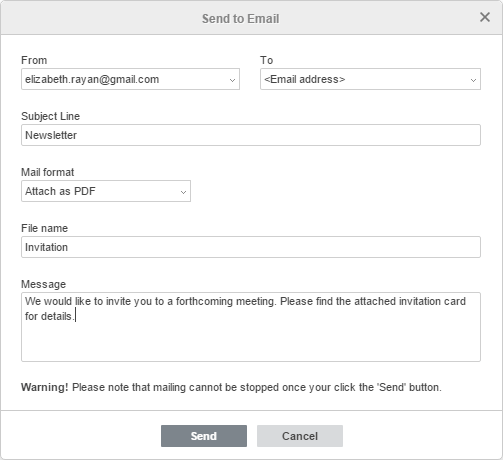
To learn more about using Mail Merge, refer to our Help Center.
Restrict external storage support
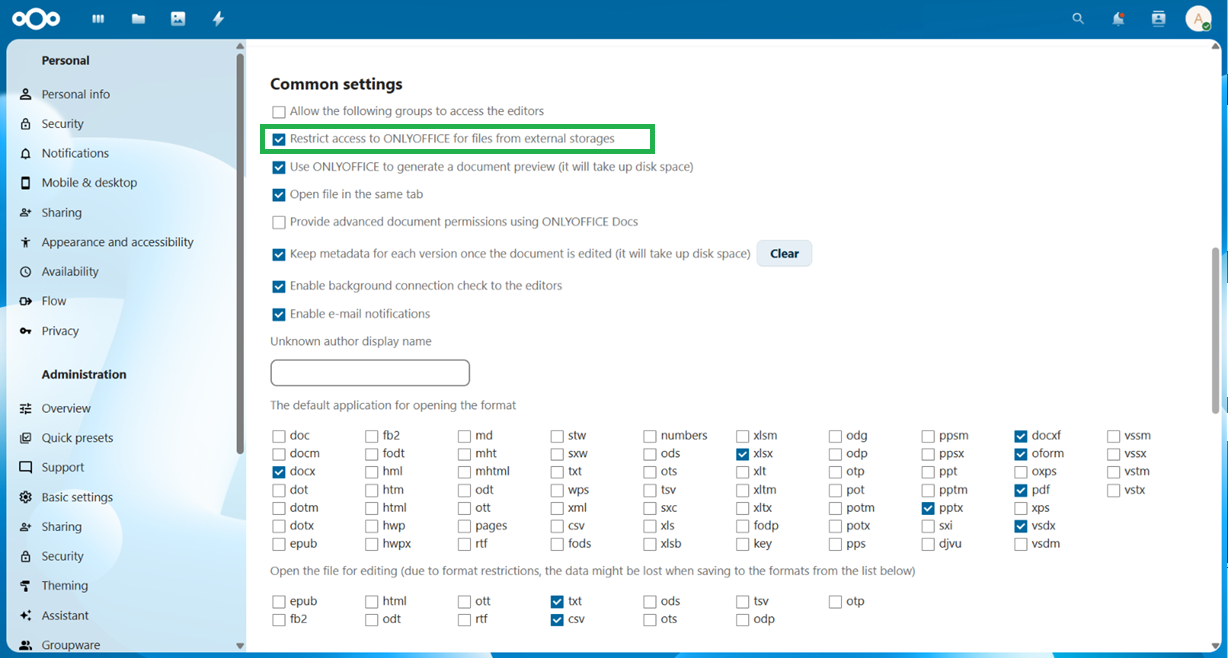
Administrators can now restrict the use of external storage within the ONLYOFFICE integration through a dedicated setting. When enabled, users will not be able to open or edit files stored in external storage locations through ONLYOFFICE.
This option gives more control over where documents can be opened and edited, which can be useful for environments with strict security or compliance requirements.
Where to find: Administration settings -> ONLYOFFICE -> Restrict access to ONLYOFFICE for files from external storages
Manage advanced permissions for Team shares
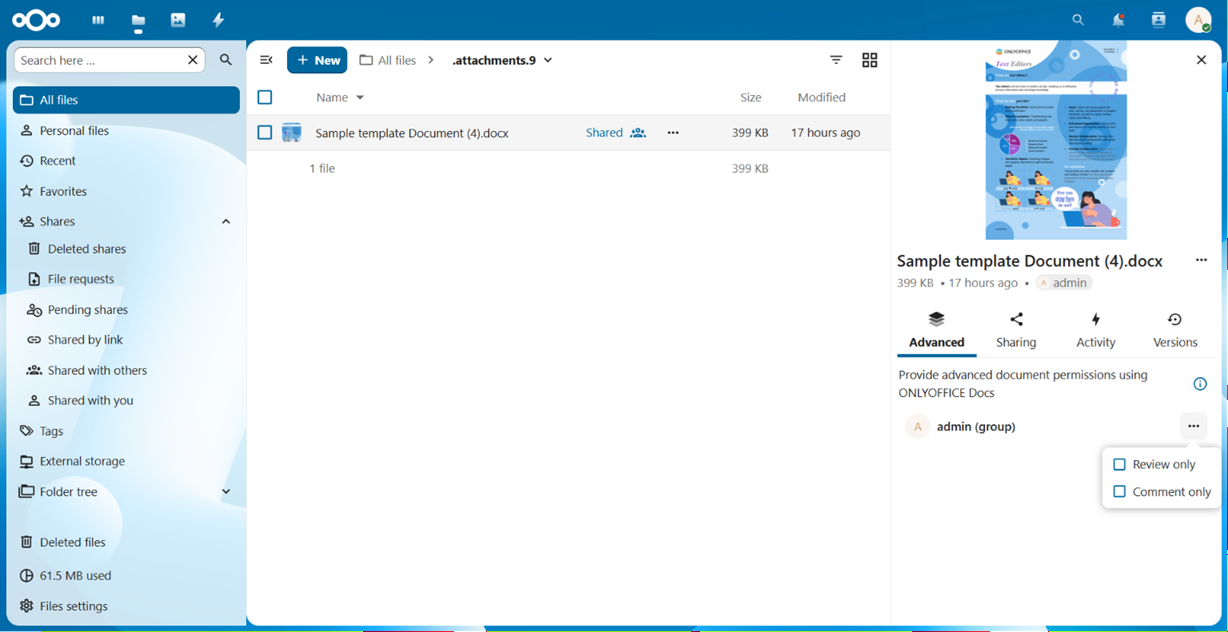
The integration now extends advanced document permissions to files shared via Nextcloud Teams (previously Circles). Users can set granular access rights directly for a Team share:
- Reviewing — users with View Only access can propose changes using Track Changes mode, without editing the document directly. Available for text documents only.
- Commenting — users with View Only access can add comments and tag colleagues in the comments section. Available for text documents and spreadsheets.
- Custom Filtering — restricts spreadsheet filtering to personal mode only, so the author’s filter view stays intact. Available for users with full access to a spreadsheet.
- Form filling — users with View Only access can fill out PDF forms without modifying the original file structure.
Whether you’re collaborating within a department, project team, or organization-wide Teams, document access can now be managed more consistently across your Nextcloud environment.
Where to find: File details -> Advanced -> Provide advanced document permissions using ONLYOFFICE Docs
Compatibility with Nextcloud 34
The connector is now fully compatible with Nextcloud 34, ensuring smooth operation with the latest platform updates.
Other improvements
This release also brings several fixes and usability improvements across the integration:
- Improved support for opening documents via shared links;
- Fixed permission-related issues when admin resharing is disabled;
- Improved handling of document and template URLs.
Read the full changelog.
Get the updated connector
Download the latest version of the ONLYOFFICE integration app from the official app marketplace to take advantage of document editing in your Nextcloud environment.
Frequently asked questions (FAQ)
Is the ONLYOFFICE connector for Nextcloud free?
Yes. The connector itself is free and can be installed directly from the Nextcloud App Store.
Do I need to install ONLYOFFICE Docs to use the integration?
Yes. To edit documents, you need to connect the app to an instance of ONLYOFFICE Docs. You can deploy the editors on your own server or use ONLYOFFICE Docs Cloud.
To try the integration first, connect a public test server of ONLYOFFICE Docs from the settings page.
Which file formats can I edit in Nextcloud?
You can work with the most commonly used formats, including DOCX, XLSX, PPTX, ODT, PDF, and TXT. The integration also supports CSV files for viewing in spreadsheets and Markdown files for saving documents.
For the full list of supported formats, please refer to the documentation.
I have a suggestion for a new feature in this integration. Where can I submit it?
Feel free to share your ideas and suggestions in our community.
Useful links
ONLYOFFICE Docs for Nextcloud: Enterprise / Community / cloud
Create your free ONLYOFFICE account
View, edit and collaborate on docs, sheets, slides, forms, and PDF files online.


