Solving the math typesetting puzzle: Introducing the LizardTypst plugin for ONLYOFFICE
Writing complex formulas in standard office suites is often challenging, with clunky workarounds and formatting issues. LizardTypst bridges the gap, bringing professional mathematical typesetting seamlessly into ONLYOFFICE. Let’s explore this innovative tool and its creator.
Meet JIJINBEI: Physicist and office ecosystem explorer
The mind behind LizardTypst is JIJINBEI, a dedicated physics researcher who pursues programming as a passionate hobby alongside his academic endeavors. His daily work requires rigorous mathematical documentation, but his interests extend far beyond the laboratory.
JIJINBEI harbors a deep fascination with office software ecosystems. Over the years, he has actively explored and used a wide variety of office suites, including ONLYOFFICE, LibreOffice, Microsoft Office, Google Workspace, and Apache OpenOffice. One of his long-term ambitions is to thoroughly explore – and master – all major office environments, whether they are open-source or commercial platforms. You can view his various projects and contributions on his GitHub profile.
This unique combination of academic rigor, technical programming skill, and a genuine passion for productivity tools perfectly positioned him to solve a common problem faced by the scientific community.

The mathematical typesetting struggle
The inspiration for LizardTypst grew directly from JIJINBEI’s daily research environment. During regular physics meetings, he frequently used Typst, specifically the slide library Touying, to prepare presentation materials. Typst has quickly gained traction in the scientific community as a fast, modern alternative to LaTeX.
However, a distinct point of friction emerged during collaborative work. When colleagues asked him to adjust layouts or modify equations, they struggled to edit the files themselves. People in physics and mathematics often think in LaTeX or Typst natively. The built-in equation editors found in common office tools often feel limiting, slow, or difficult to use for complex formulas.
While solutions like IguanaTex exist to allow LaTeX input inside Microsoft Office, they come with a significant catch: they require a full local LaTeX installation. For general users or collaborators who just want to tweak a single equation, downloading and installing gigabytes of LaTeX packages is simply not a viable option.
JIJINBEI realized the scientific community needed a better way to collaborate without sacrificing typesetting quality.
Enter LizardTypst: a modern solution
Typst is written in Rust, which gives it a remarkably clean architecture and strong portability. Because of this modern foundation, Typst can be compiled to WebAssembly. This technological breakthrough opened up an exciting possibility: running a powerful typesetting engine entirely inside JavaScript, directly within a web browser.
Drawing inspiration from the IguanaTex plugin, JIJINBEI conceptualized LizardTypst. The goal was simple but ambitious: enable high-quality mathematical typesetting inside ONLYOFFICE without requiring any local LaTeX or Typst installations.
By leveraging the ONLYOFFICE API and the typst.ts library, JIJINBEI built a simple yet highly effective plugin. The development process was technically stimulating. While writing the JavaScript extension was straightforward, ensuring cross-platform compatibility across Ubuntu, macOS, and Windows required careful testing and dedication. The result is a smooth, reliable plugin compatible with both the self-hosted and desktop versions of the ONLYOFFICE editors.
Key features of the LizardTypst plugin
LizardTypst changes how you handle formulas in your slides. It provides a modern, accessible solution that eliminates complex local setups. Here is what makes the plugin stand out:
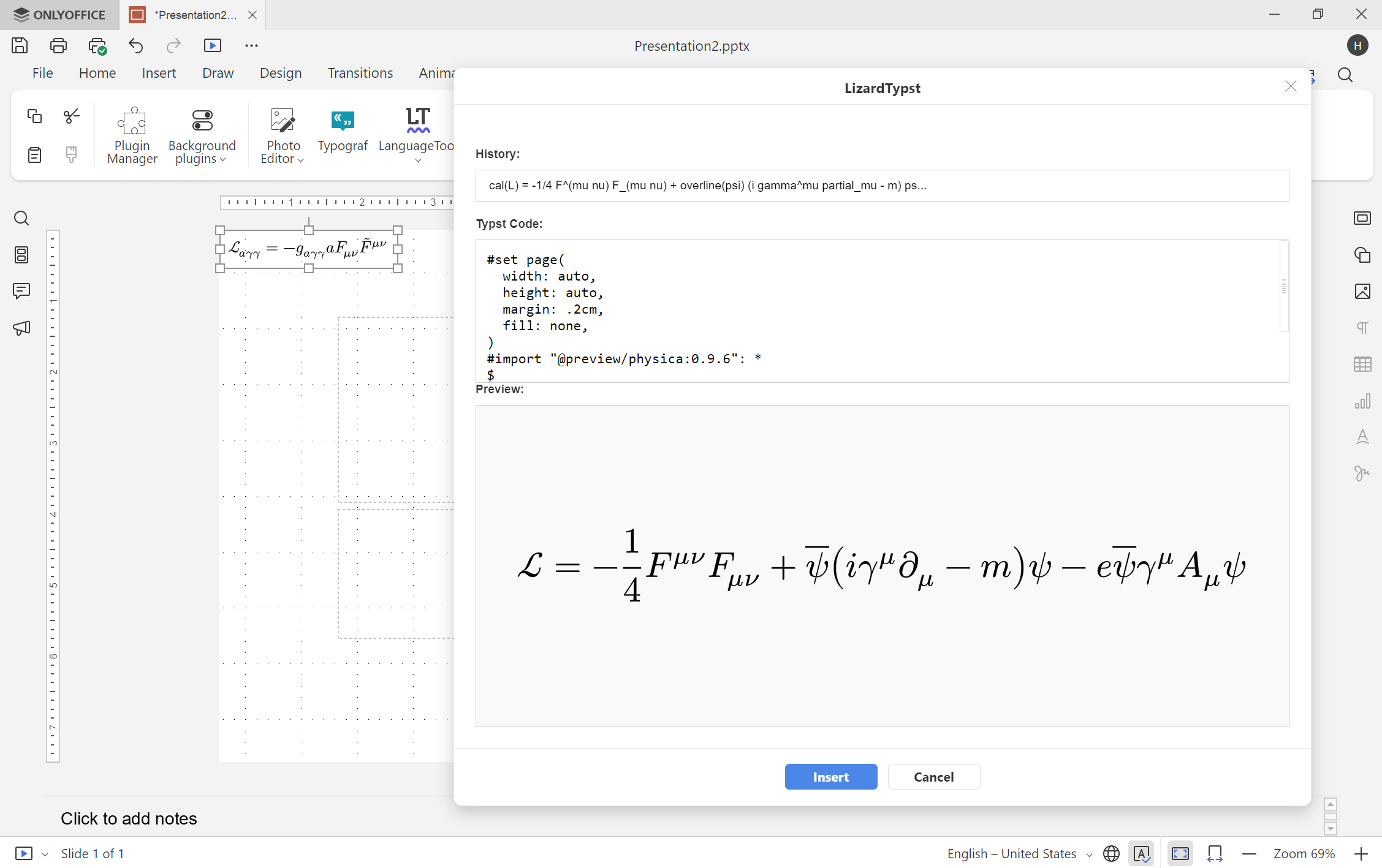
- Real-time rendering. When writing complex equations, you need immediate feedback. LizardTypst features a live preview that renders your Typst formula as you type. This interactive editing experience ensures you catch syntax errors instantly and perfectly format your equations before inserting them into your file.
- Zero local installation required. Unlike older solutions that rely on server-side rendering or heavy local LaTeX setups, LizardTypst handles everything in the browser. By utilizing the typst.ts library to compile Typst code via WebAssembly, the plugin works completely out of the box. You do not need to install any additional software or dependencies on your machine.
- Scalable Vector Graphics (SVG). Quality matters, especially in professional research papers and presentations. LizardTypst inserts your formulas as Scalable Vector Graphics (SVG). This ensures your equations remain razor-sharp and maintain their high quality at any zoom level, whether viewed on a screen or printed on paper.
Please note: The LizardTypst plugin is currently available exclusively for ONLYOFFICE presentations.
How to get started
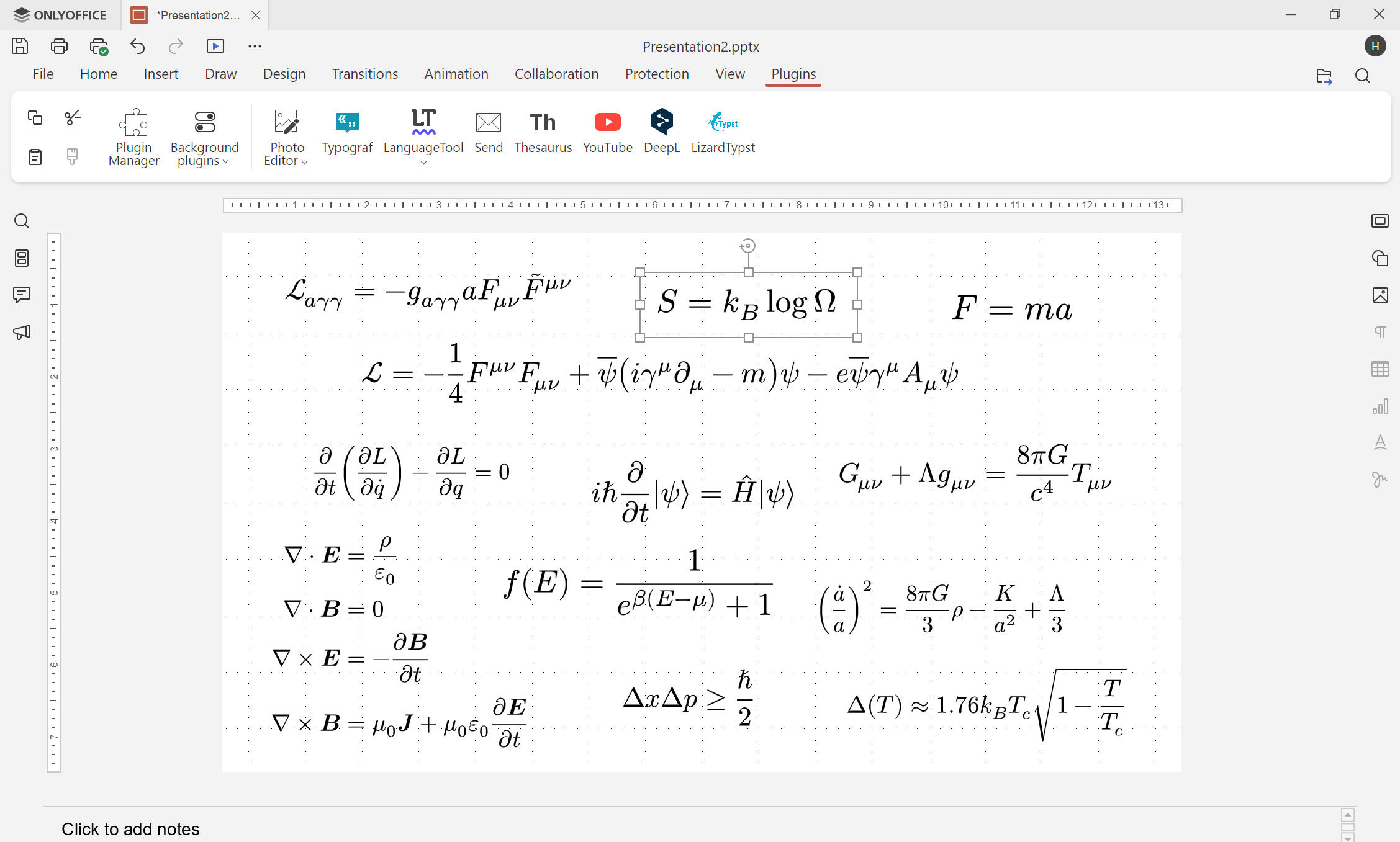
First, open your presentation in ONLYOFFICE. Navigate to the Plugins tab and open the Plugin Manager. Search for LizardTypst in the list, click Install, and close the manager.

To use the tool:
- Go to the Plugins tab and click the LizardTypst icon.
- Enter your Typst code in the input area.
- Watch the real-time preview.
- Once your formula looks exactly how you want it, click the Insert button to place the SVG image directly into your file.
The power of Open-Source collaboration
The creation of LizardTypst is a testament to the strength of the open-source community. JIJINBEI notes that the open nature of ONLYOFFICE plugins, which are openly hosted on GitHub, allowed him to study existing source code, understand best practices, and implement the best design patterns for his own tool.
He credits the developers behind Typst, the typst.ts project, and legacy tools like IguanaTex for laying the groundwork that made this project possible. Furthermore, the responsive technical assistance from the ONLYOFFICE development team helped ensure a smooth submission and review process.
Open-source ecosystems thrive entirely on this kind of global collaboration. Through the shared efforts of brilliant tool makers, supportive platforms, and dedicated developers like JIJINBEI, we all gain access to better, faster, and more efficient ways to share our ideas with the world.
If you regularly work with mathematical formulas, install the LizardTypst plugin in ONLYOFFICE today and experience the future of collaborative typesetting.
P.S. Calling all developers and tech enthusiasts! We invite you to contribute to our project by creating innovative plugins. Have a great idea? Don’t hesitate to share your creations with us at marketing@onlyoffice.com. We’d love to see them.
Useful links
LizardTypst plugin: Marketplace / GitHub
ONLYOFFICE plugin documentation
Create your free ONLYOFFICE account
View, edit and collaborate on docs, sheets, slides, forms, and PDF files online.


