Back to school with ONLYOFFICE: join our free course on creating PDF forms
Fillable PDF forms are everywhere: job applications, contracts, registration forms, questionnaires, invoices, and internal business documents. Creating one that is intuitive, easy to complete, and works exactly as expected is another story. Choosing the right field types, setting validation, organizing the layout, assigning roles, and making sure everything behaves correctly requires both the right tools and the right skills.
As back-to-school season approaches, we’re opening one of our professional training courses to everyone for free.

What the ONLYOFFICE PDF Form Creator Challenge is
We are launching a three-week online course focused entirely on creating fillable PDF forms with the ONLYOFFICE Form Creator.
Unlike a traditional self-paced course, this challenge combines video lessons with hands-on practice and direct interaction with the ONLYOFFICE team. Throughout the course, participants can ask questions, receive guidance from the ONLYOFFICE team, and apply new skills while working on their own PDF forms.
Course details
When: August 17, 2026
Where: online via ONLYOFFICE Academy
Duration: 3 weeks
Access to course materials: throughout the course and for 3 weeks after it ends
Format: video lessons, quizzes, final project, and Q&A with the ONLYOFFICE team
Who should join: users interested in creating professional PDF forms, especially HR specialists, educators, administrators, and anyone who regularly works with fillable documents.
Price: $375 Free
What the course covers
The course covers the complete workflow of creating professional fillable PDF forms in ONLYOFFICE. By the end of the course, participants will be able to:
- create PDF forms from scratch;
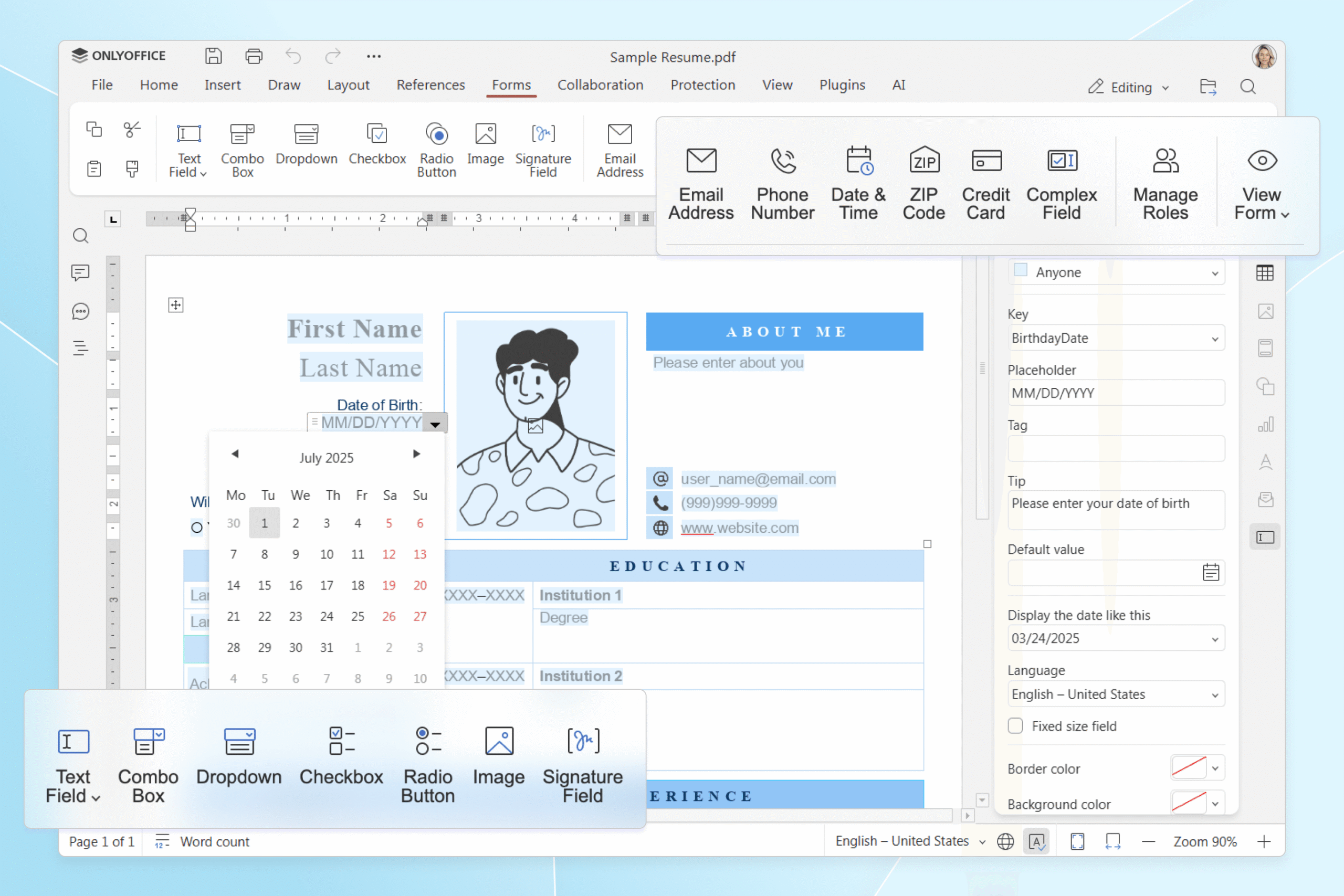
- work with all available field types, including text fields, combo boxes, drop-down lists, checkboxes, radio buttons, image and signature fields;
- configure specialized fields for email addresses, phone numbers, dates, ZIP codes, and credit card numbers;
- build more advanced forms using complex fields, required fields, and field locking;
- organize, move, edit, and manage form elements efficiently;
- configure roles and access rights for different recipients;
- prepare forms for distribution and make them easy to fill in.
The course concludes with a final assignment to create a professional PDF form from scratch.
Get an official ONLYOFFICE certificate
Participants who complete the course, submit their final project will receive an official ONLYOFFICE certificate. It’s a great way to showcase your new skills, strengthen your portfolio, and demonstrate your expertise in working on real PDF form projects.
Register today
Register now and discover how to build professional PDF forms with ONLYOFFICE.
Go beyond the course and join the ONLYOFFICE team
The authors of the best final projects will have an opportunity to join the ONLYOFFICE team for a remote collaboration, contributing to real PDF form projects.
Create your free ONLYOFFICE account
View, edit and collaborate on docs, sheets, slides, forms, and PDF files online.