Best AI prompts for writing, editing, and formatting documents
Most people use AI writing tools the way they use search engines: they type a rough description and hope for something useful. But AI models respond to language the way skilled collaborators do. Give them context, constraints, and a clear goal, and the output shifts from mediocre to genuinely useful.
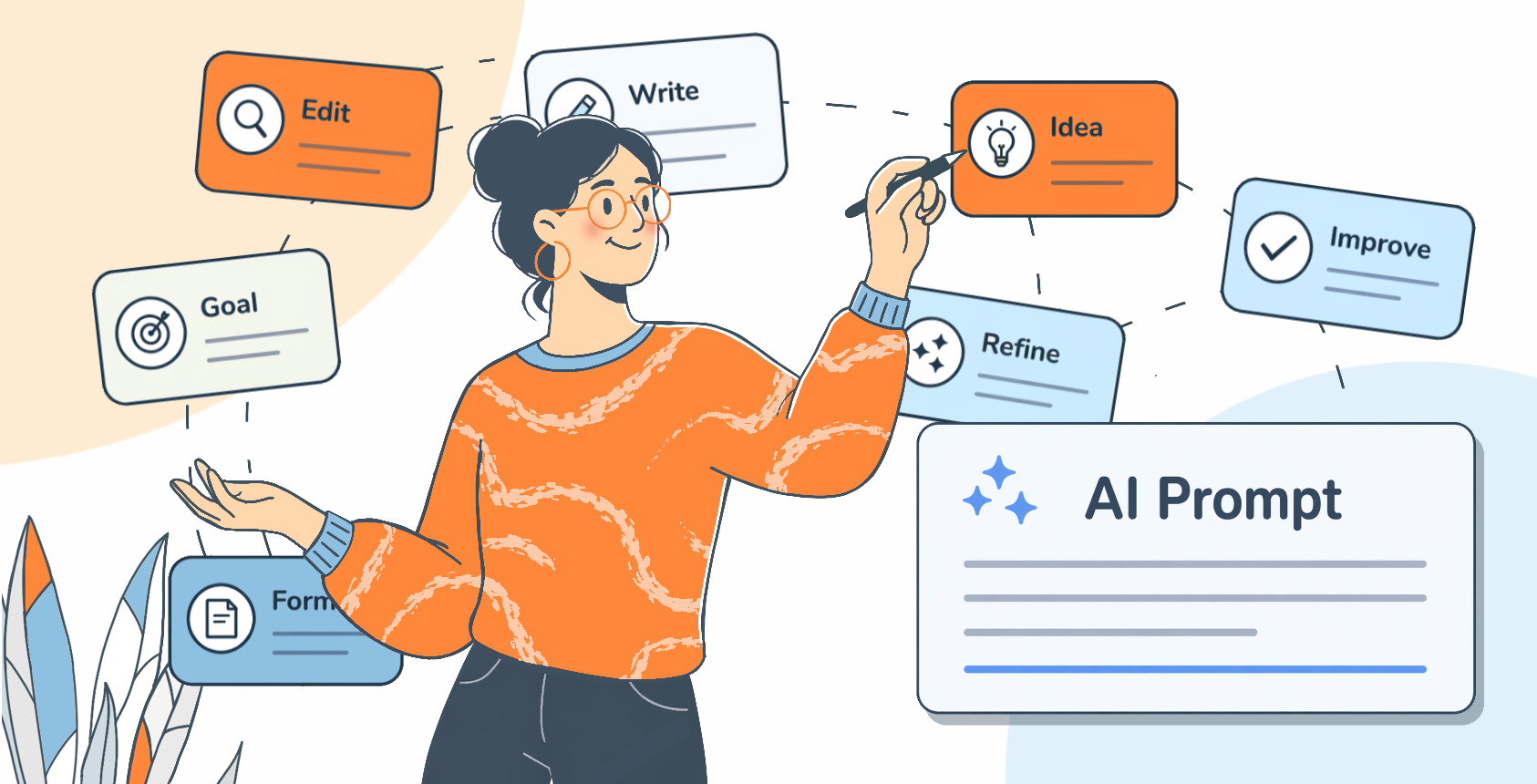
This guide collects the best prompts for every stage of document work: starting from nothing, drafting with structure, editing ruthlessly, adjusting tone, and formatting for a final audience. Each prompt comes with an explanation of why it works and how to adapt it to your situation.
These prompts are not magic spells, but frameworks you can customize.
1. Starting from nothing
The blank page problem is real, and AI is genuinely good at solving it. The trick is not asking the AI to “write something about X.” That produces generic output. Instead, front-load the prompt with the conditions that matter: who is reading, why they are reading, and what they should do or feel afterward.
Prompt:
I need to write [document type]. The audience is [describe them: seniority, familiarity with the topic, what they care about]. The goal is to make them [take an action / feel reassured / understand a decision]. Here is the core information I need to include: [bullet your key points]. Write a first draft in [formal / plain / conversational] language, around [word count] words.
This prompt hands the AI the raw material and the job description at the same time. You are not asking it to invent; you are asking it to arrange and express.
When you do not know what you want to say yet, use AI to think alongside you before writing anything:
Prompt:
I need to write about [topic] for [audience]. I have not figured out my main argument yet. Ask me five questions that will help me clarify what I actually want to say.
For longer documents, use an outline prompt before drafting. It lets you course-correct before thousands of words exist in the wrong direction:
Prompt:
Before writing anything, give me a detailed outline for [document type] on [topic]. The document should be around [length] and the reader should finish it by understanding [key takeaway]. For each section, include a one-sentence description of what it covers and why it belongs in this order.
Including “why it belongs in this order” forces the AI to think about logic and flow, not just topic coverage. It gives you something concrete to push back on if the structure does not work.
2. Editing and rewriting
Editing is where AI tools earn their keep, and where most people underuse them. Asking an AI to “make this better” is too vague to be useful. The most effective editing prompts name the problem before asking for a solution.

Cutting length
One of the most common document problems is writing that is technically correct but exhausting to read. Too many words, too much hedging, too many qualifications.
Prompt:
Here is a passage I have written: [paste text]. Cut it roughly by [30 / 40 / 50] percent. Remove every word that does not carry information. Do not add new information and do not change the meaning. Keep my vocabulary where possible. Show me the edited version only, not a list of changes.
The instruction to show the edited version only is important. Getting a list of changes before seeing the result makes you evaluate the process rather than the output. Judge the output first.
Fixing passive and vague writing
A persistent problem in professional writing is the passive voice combined with abstract nouns, producing sentences where nothing is clearly happening and no one is clearly doing it.
Prompt:
Rewrite the following passage so that every sentence has a clear human subject doing something concrete. Replace passive constructions with active ones. Replace abstract nouns derived from verbs (like “implementation,” “consideration,” “utilization”) with the verbs themselves. Keep the meaning intact: [paste text].
Tightening arguments
Sometimes the problem is not style but structure: an argument that meanders, a point that gets made three times, a conclusion that does not follow from the evidence.
Prompt:
Read the following piece of writing as a critical editor: [paste text]. Tell me: where does the argument lose focus? Where does the same point get made twice? Where does a claim appear without support? Do not rewrite anything yet. Give me a diagnostic report with specific line references if possible.
Separating diagnosis from treatment lets you decide which problems are actually worth fixing before any rewriting happens.
Improving rhythm
Reading writing that has good content but poor rhythm is tiring in ways readers cannot always name. This prompt targets that specific problem.
Prompt:
Read this passage aloud in your head, paying attention to rhythm: [paste text]. Rewrite it so that the sentences vary in length and structure. No more than two consecutive sentences should begin with the same word. The content should not change. Focus only on rhythm and variety.
3. Tone adjustment
Tone is one of the hardest things to get right in writing, and one of the things AI handles best when prompted correctly. The key is being specific. “More professional” is almost meaningless. “More direct, fewer softening qualifiers, shorter sentences” is actionable.

Moving between registers
The same information often needs to reach different audiences. This prompt handles the translation efficiently.
Prompt:
Here is a piece of writing: [paste text]. Rewrite it for [a general audience who knows nothing about this field / a technical specialist / a senior executive who wants the bottom line / a skeptical reader who needs to be persuaded]. Keep all the factual content. Change only what needs to change to make it land correctly for that reader.
Stripping corporate language
Business writing has accumulated a thick layer of jargon that signals effort without conveying meaning. Words like “synergies,” “going forward,” “circle back,” “leverage” used as a verb.
Prompt:
Rewrite the following text, removing all business jargon and replacing it with plain language. Any phrase that could be replaced by a simpler word without changing the meaning should be replaced. Flag in brackets any terms you were uncertain about: [paste text].
Adding warmth or authority
Different documents call for different emotional registers. A customer apology letter needs warmth. A compliance notice needs authority. Getting this wrong costs credibility.
Prompt:
Rewrite this message to sound [warmer and more human / more authoritative and confident / more empathetic to the reader’s situation / more direct without being blunt]. Do not change what the message says. Change how it feels to read: [paste text].
If you want the AI to match a specific voice rather than apply a generic one, paste two or three examples of writing you like before giving the editing instruction. AI models pick up on stylistic patterns from examples more reliably than from descriptions of style.
4. Formatting and structure
Formatting is not decoration: it is the difference between a document that gets read and one that gets skimmed or ignored. AI can help with formatting decisions at every level.

Converting notes into a structured document
Prompt:
Here are my raw notes on [topic]: [paste notes]. Convert these into a well-structured document with clear headings and subheadings. Group related points together. Use numbered lists only where sequence matters; use bullet lists for parallel items; use continuous prose for anything that requires explanation or nuance. The final document should be ready to share with [audience].
Designing a comparison table
Prompt:
I have the following information that I need to present as a comparison: [describe what you are comparing and on what dimensions]. Design a table that makes it easy for someone to quickly see the differences and make a decision. The columns should be labeled in plain language. Include a brief caption explaining what the reader should take from the table.
Creating an executive summary
Prompt:
Write an executive summary of the following document: [paste document]. The summary should be no longer than [200 / 300 / 400] words. It must answer these questions in order: What is this document about? What decision or action does it recommend? What is the single most important piece of evidence supporting that recommendation? What are the main risks or uncertainties?
Formatting for specific document types
Naming the document type in your prompt tends to produce output that respects established conventions. Some examples:
- Rewrite this as a formal memo: header block, clear subject line, brief context, numbered action items, deadline.
- Format this as a one-page policy brief: the problem in two sentences, the proposed solution, three bullet points of evidence, a clearly labeled recommendation.
- Turn these notes into a project status report with sections: Summary, Progress, Blockers, Next Steps, Owner.
Working with HTML and Markdown files
A common scenario in content work is needing to modify a structured file, for example translating it, adjusting the tone, or updating specific sections, without breaking the underlying formatting. HTML and Markdown files contain a mix of visible text and structural syntax: tags, attributes, anchors, shortcodes, YAML frontmatter, and template variables. Editing without care means the file may no longer render correctly even if the text looks fine in a plain text editor.

Translating HTML or Markdown without touching the markup
The most frequent mistake when using AI to translate a structured file is getting back a version where attributes have been translated, tags have been moved, or link text has been changed while the hypertext reference was left in the original language. This prompt prevents that.
Prompt:
Translate the following [HTML / Markdown] file from [source language] to [target language]. Translate only the visible text: the content that a reader would see in a browser or rendered document. Do not translate or modify any of the following: HTML tags and attributes, href and src values, CSS class names, id attributes, Markdown syntax characters (#, *, **, [], ()), YAML frontmatter keys, shortcodes, and template variables such as {{variable}} or %{variable}. Return the complete file with the same structure and formatting as the original.
If the file contains image alt text, decide in advance whether to translate it. Alt text is read by screen readers and should usually be translated, but since it lives inside an attribute value you need to explicitly tell the AI to treat it as an exception to the no-attributes rule.
Rewriting text without altering structure
Sometimes you need to improve the prose in a file, shortening sentences, adjusting tone, or fixing awkward phrasing, without changing anything structural. This is trickier than it sounds because rephrasing a heading in Markdown can silently break anchor links elsewhere in the document.
Prompt:
Rewrite the body text in the following [HTML / Markdown] file to be [more concise / more formal / clearer for a non-technical audience]. Do not change any headings. Do not add, remove, or modify any HTML tags, Markdown syntax, links, image references, id attributes, or YAML frontmatter. Only the prose content of paragraphs and list items should change. Return the complete file.
If you do need headings rewritten as well, handle the anchor risk explicitly:
Prompt:
Rewrite the following headings for clarity: [list headings]. For each one, give me the new text and the corresponding URL-safe anchor slug it will generate (lowercase, spaces replaced with hyphens). I will check these against existing internal links before applying the changes.
Preserving template variables and shortcodes
Many Markdown and HTML files used in content management systems contain dynamic elements: variables like {{author_name}} or %{count}, shortcodes and conditional blocks. These must pass through any AI editing completely unchanged.
Prompt:
The following file contains template variables in the format {{variable_name}} and shortcodes in the format [shortcode attribute=”value”]. Treat every occurrence of these as untouchable placeholders. Do not translate, paraphrase, reformat, or move them. Your task is: [describe the editing task]. Return the complete file.
If your system uses a less common syntax for variables or shortcodes, include one or two examples directly in the prompt. Do not assume the AI will recognize every templating convention automatically.
Updating a single section without touching the rest
When a file is long and only one section needs updating, sending the whole file is still advisable because it gives the AI context. But you need to be explicit that only one part should change.
Prompt:
Here is a complete [HTML / Markdown] file: [paste file]. I need you to update only the section under the heading “[heading text]”. The change needed is: [describe the change]. Every other section, all markup, all attributes, all links, and all frontmatter must remain exactly as they are. Return the complete file with only that one section changed.
Asking for the complete file back rather than just the edited fragment is important. It prevents the temptation to manually splice a piece back in, which is where structural errors tend to creep in.
5. Advanced techniques
Ask for multiple versions
Rather than refining a single output through multiple rounds of editing, ask for distinct alternatives upfront.
Prompt:
Write three different versions of [the opening paragraph / the subject line / the call to action]. Each should take a genuinely different approach: one direct, one that leads with a question or problem, one that opens with a concrete detail or anecdote. I will choose one to develop further.
Use negative constraints
Telling an AI what not to do is often as useful as telling it what to do.
Prompt:
Write a conclusion for this document: [paste document]. Do not summarize what was already said. Do not use the word “conclusion” or “in summary.” Do not introduce new information. Instead, end with the implication or next step that follows naturally from everything above.
Chain your prompts deliberately
For complex writing tasks, treat the process as a chain of smaller, well-defined steps. A reliable chain for any significant document looks like this:
- Clarify the purpose and audience
- Produce an outline
- Draft section by section
- Edit for concision
- Adjust tone
- Format for the final audience
Collapsing multiple steps into one prompt usually produces results that are acceptable in every dimension but excellent in none.
Give the AI a specific failure to fix
When you know exactly what is wrong with a piece of writing, name it precisely. The more specific the diagnosis, the more surgical the fix.
Prompt:
This paragraph makes its main point too late, buries the key fact in the middle of the third sentence, and ends weakly. Fix those three specific problems without changing anything else: [paste paragraph].
A universal prompt template
Use this template as a starting point for any writing, editing, or formatting task. Fill in each bracket and you will get a workable result to develop further.
Prompt:
Context: I am writing [document type] for [audience]. The goal is to [desired outcome].
Task: [Write / Edit / Format / Summarize / Rewrite] the following: [paste content or describe what you need].
Constraints: Length should be around [word count]. Tone should be [describe tone]. Do not [specific things to avoid].
Output format: Give me [a single draft / three options / an outline / a bullet list of changes].
The writers who get the most from these tools are not those who delegate the thinking. They are those who use AI to execute thinking they have already done, to pressure-test drafts they have already started, and to handle the mechanical work of restructuring and reformatting so they can focus on what only they can provide: judgment, knowledge, and a point of view.
Put these prompts to work in ONLYOFFICE
Reading a list of prompts is one thing. Having them available the moment you are inside a document is another.
ONLYOFFICE is a free, open-source office suite for writing, editing, and collaborating on documents, spreadsheets, and presentations, available in the cloud and as a desktop app for Windows, macOS, and Linux. It has a built-in AI plugin that, once installed and activated from the Plugin Manager, adds a dedicated AI tab directly to the editor toolbar.
From there you can generate text, rewrite a selected passage, make it longer or shorter, summarize a section, fix grammar, translate content, or send a free-form request to the assistant, all without leaving your document.
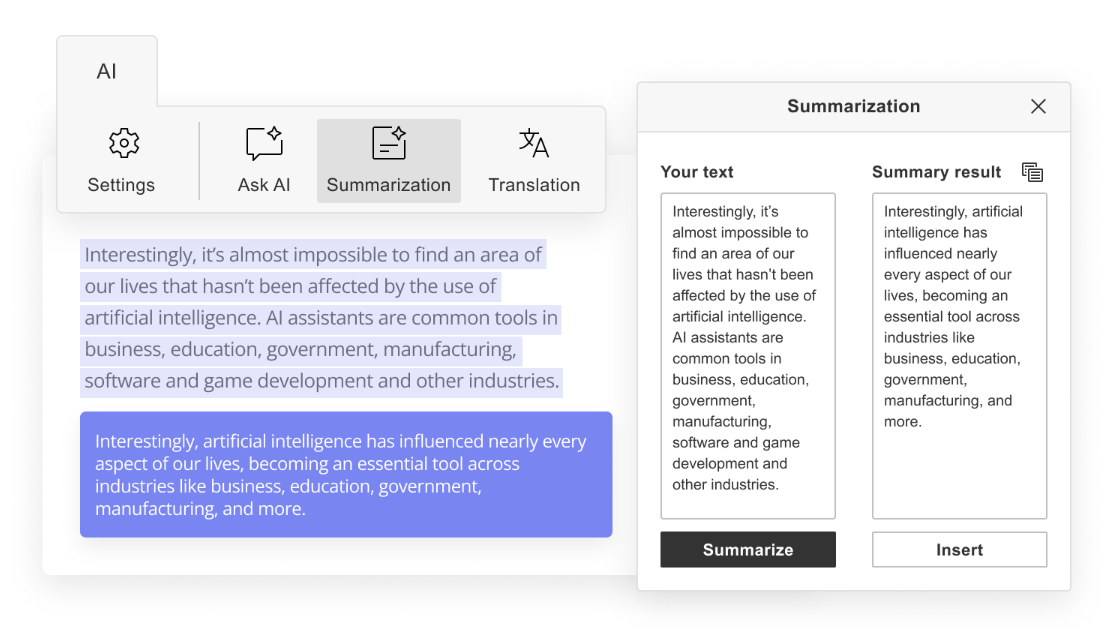
You can also create custom assistant functions with your own prompts and pin them to the toolbar for one-click access, which makes the reusable prompts in this guide genuinely practical to apply every day.
ONLYOFFICE supports a wide range of AI providers, so you can connect the model you already use or prefer. Supported providers include OpenAI, Anthropic, Google Gemini, Mistral, Groq, DeepSeek, Together AI, Ollama, LM Studio, and more, including local models and custom integrations. Different models can be assigned to different tasks, so you might use one for drafting and rewriting, and another for translation or OCR.
Conclusion
A prompt is not a shortcut. It is a specification. The clearer you are about what you need, who it is for, and what good looks like, the more reliably AI delivers something worth using. The prompts in this guide are starting points, not finished formulas. Every one of them will work better once you adapt it to your subject, your audience, and your own writing habits.
Start with one category that matches your current bottleneck. If the blank page is the problem, use the context-first drafting prompts. If you are drowning in content that needs editing, use the diagnostic approach before touching a single sentence. If you manage multilingual or structured files, the HTML and Markdown prompts will save you from the kind of errors that only surface when a page fails to render in production.
The underlying principle does not change across any of these use cases: tell the AI what you know, what you need, and what it must not do. Everything else follows from that.
Write and edit smarter with ONLYOFFICE
Get ONLYOFFICE and start drafting, rewriting, summarizing, and formatting all in one place.
Create your free ONLYOFFICE account
View, edit and collaborate on docs, sheets, slides, forms, and PDF files online.


