Is AI your real assistant? How ONLYOFFICE made friends with artificial intelligence
From a single ChatGPT plugin to a full AI ecosystem, the story of how ONLYOFFICE integrated artificial intelligence into its editors and collaboration platform, step by step, without compromising on control.
There is a particular kind of frustration that every knowledge worker knows well. You are halfway through a document. You need to rephrase a paragraph, check the grammar of a section you wrote too quickly, translate a line for a colleague in another country, or figure out why that spreadsheet formula isn’t working. Normally, you open another tab, switch tools, copy the text across, get the answer, copy it back, and lose the thread of what you were doing.
It is a small friction. But it happens dozens of times a day. And small frictions, accumulated, are where most productivity actually disappears.
The promise of AI in office software is that this friction goes away. The reality, more often than not, is that the AI sits alongside the tool rather than inside it, a chatbot in a sidebar, a button that opens a new window, another context switch dressed up as a solution.
When ONLYOFFICE began exploring AI integration, we were clear about one thing: if the AI is not inside the document, it is not solving the right problem. Here is how we got there, and where we are now.
2023. The first step: a ChatGPT plugin
The history of AI integration in ONLYOFFICE editors dates back to 2023, when the team released a ChatGPT-based AI plugin. It was a deliberate first step rather than a complete solution. The plugin connected ONLYOFFICE editors to OpenAI’s API, allowing users to send selected text to ChatGPT and receive a response within the document environment.
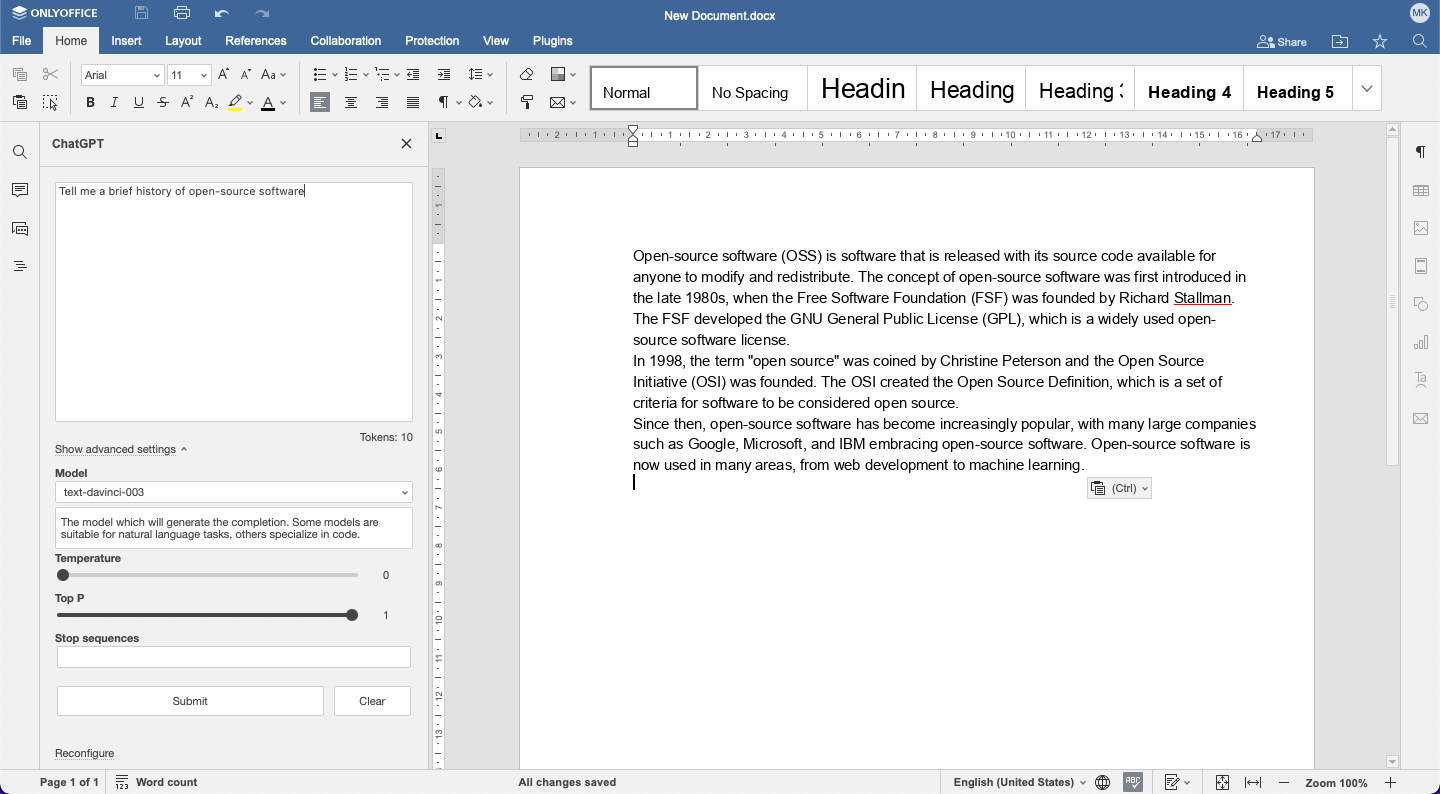
The functionality was limited, but the architecture was intentional. Rather than hard-coding an AI service into the product, the team built the AI capability as a plugin, meaning it could be installed when needed, removed when not, and updated independently of the core editors. That decision, made in the first release, defined the philosophy that still governs ONLYOFFICE’s AI approach today.
The initial use cases were straightforward: ask ChatGPT to rephrase a paragraph, summarize a section, or generate a first draft. The text came back into the document. No separate tab. No copy-paste. The friction was reduced, even if the feature set was narrow.
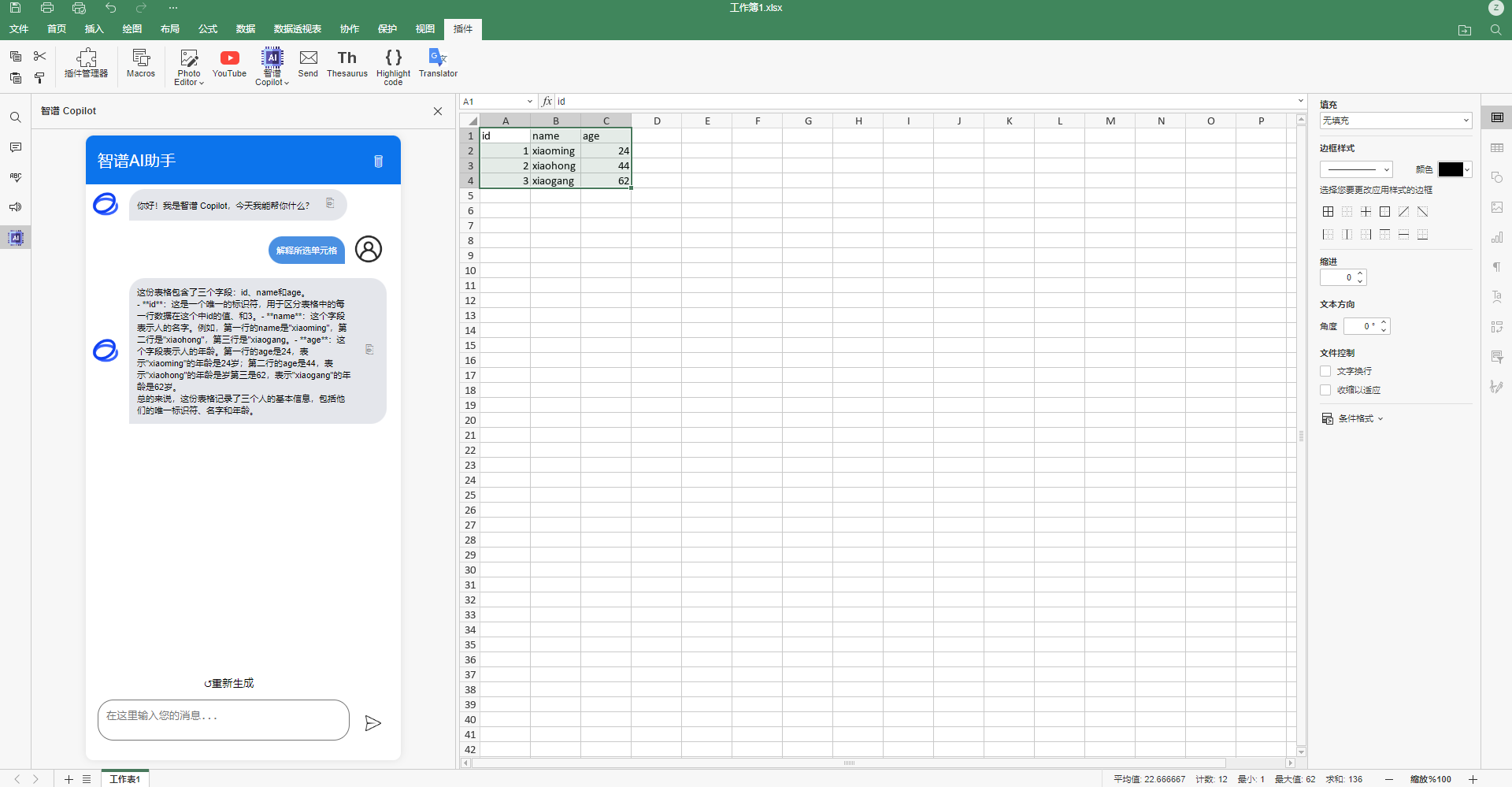
The same year demonstrated that the plugin model could serve very different markets. In autumn 2023, the ZhiPu Copilot plugin was released in the Plugin Marketplace, developed by Lin Jianbo as part of the ONLYOFFICE Open Source Promotion Plan. The plugin offers the same capabilities as the ChatGPT plugin but is tailored to work seamlessly with Chinese AI, harnessing the power of ZhiPu AI and integrating cutting-edge AI models to enhance the ONLYOFFICE experience. Its features, including summarising, explaining, and translating selected text, are available in Chinese and six other languages. For ONLYOFFICE users in China, where OpenAI access is restricted, it was the AI integration that actually worked in their environment. The plugin was later enhanced by Linji Zhang with additional features and performance improvements and remains available in the Plugin Marketplace.
2024. From one model to many
The first version of the plugin had one limitation that became apparent quickly: it tied users to a single AI provider. For organizations with data governance requirements, using OpenAI was often not an option. For users who preferred a different model, there was no choice. For teams in regions where OpenAI access was restricted, the plugin was simply unavailable.
The 2024 rebuild addressed this directly – completely updated and more flexible AI functionality in the editors. The team significantly improved the functionality of the plugin and made it compatible with all popular AI models and providers, not only OpenAI’s ChatGPT, redefining the philosophy of using AI in office software.

The December 2024 update was the decisive moment. The current version of the plugin lets the user rely on a certain AI provider. Users could now connect their own API key from any supported provider, choose their model, and use it inside the editors without ONLYOFFICE being in the data flow at all. For organizations running Ollama locally, even a fully air-gapped deployment became possible: AI that never contacts an external server.
This was a philosophical shift as much as a technical one. ONLYOFFICE was not in the business of deciding which AI model was correct for a given user or organization. The plugin became infrastructure for AI rather than a specific AI implementation.
By the end of 2024, supported providers included OpenAI, Anthropic (Claude), Google Gemini, Mistral, Groq, and local models via Ollama. The plugin could be configured once and used across the Document Editor, Spreadsheet Editor, Presentation Editor, and PDF Editor simultaneously.
2025. The inline agent: AI that lives inside the document
The AI plugin update released in August 2025 introduced a feature that changed how the AI experience actually felt to use: the AI inline agent.
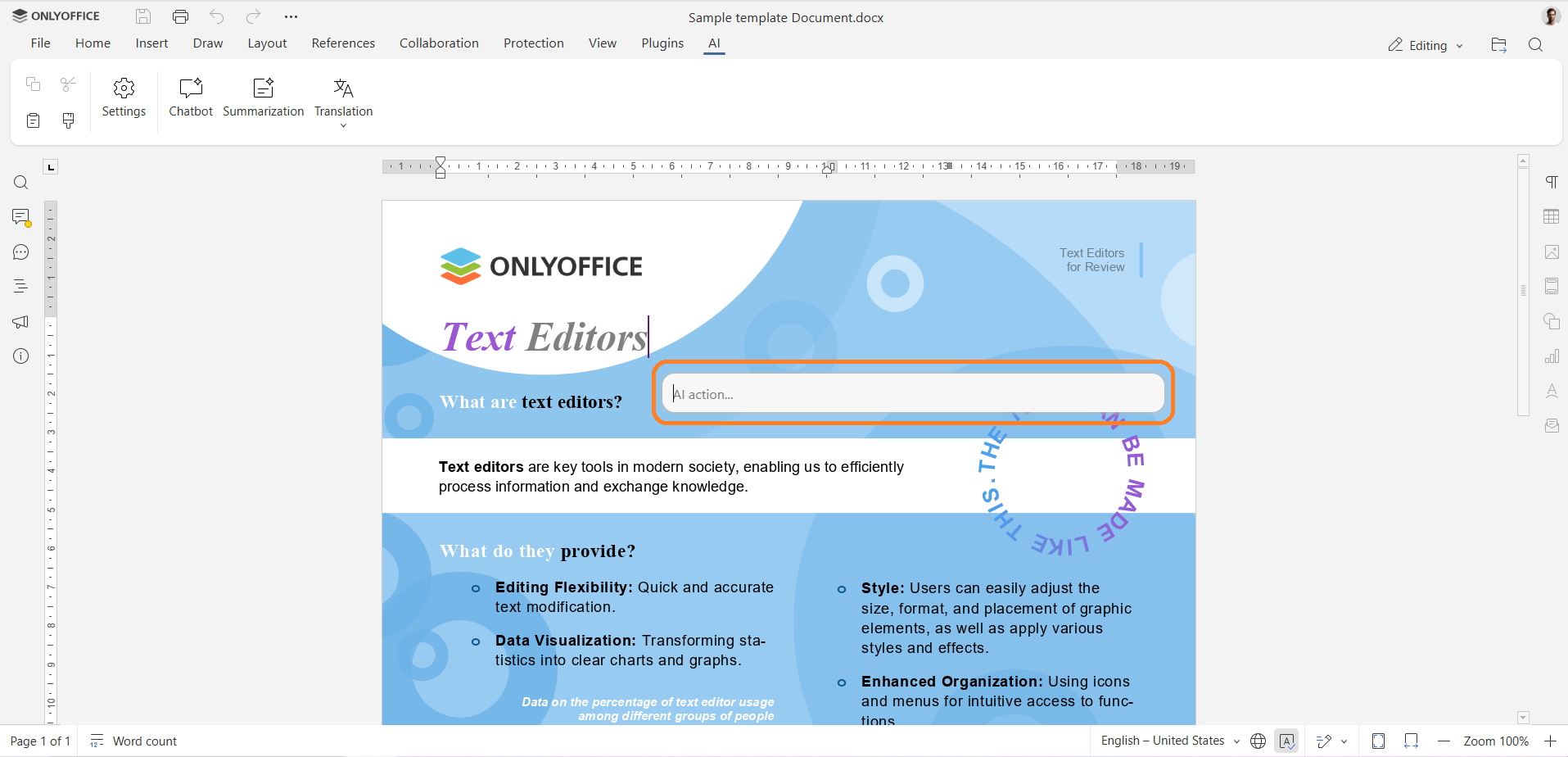
The AI inline agent is a contextual assistant available within ONLYOFFICE editors through a floating panel. It allows users to communicate in natural language to perform common tasks without searching menus.
The practical difference from the standard plugin is significant. With the plugin, you select text, right-click, choose an action, and the result replaces or appears below the selection. With the inline agent, you press Ctrl+/ anywhere in the document, type a request in natural language, like “make this paragraph shorter,” “convert this list into a table,” “add a column that calculates the percentage change”, and the editor updates. The agent keeps conversation history, allowing you to refine results step by step or continue complex requests.
It enables text generation and rewriting, formatting without searching through menus, data analysis and visualization in spreadsheets, and diagram creation in presentations, all integrated into the workflow.
Early 2025. The plugin matures: custom assistants and voice input
The 2025 updates brought two features that shifted how users actually interacted with AI inside documents.
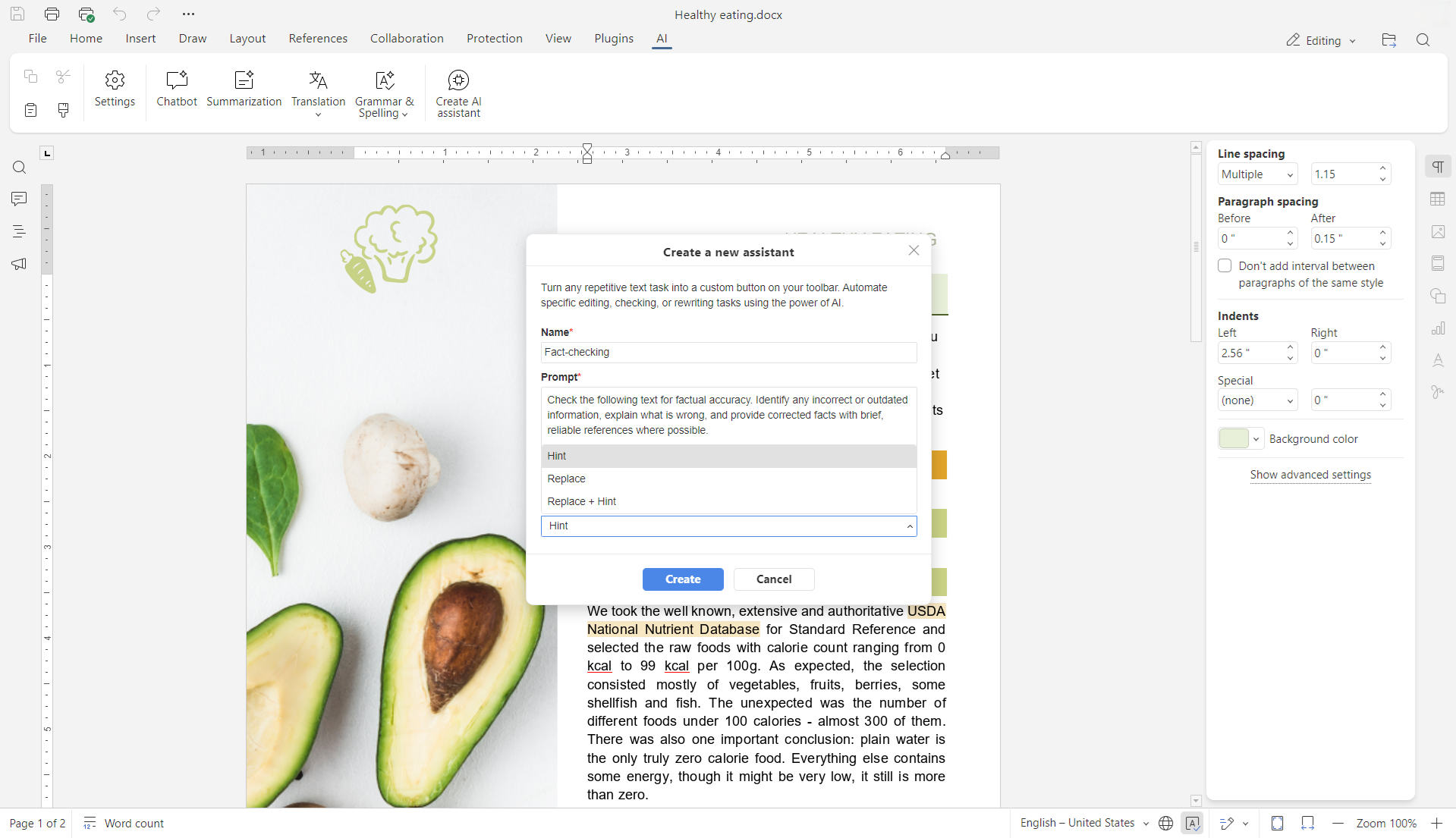
The first was custom AI assistants. Rather than typing the same prompt repeatedly: “simplify this for a non-technical audience”, “extract the key dates from this section,” “rewrite this as a formal letter”, users could now define named assistant functions with custom prompts and pin them to the toolbar. One click, applied to selected text, results are inserted directly. The repetitive prompt became a button.
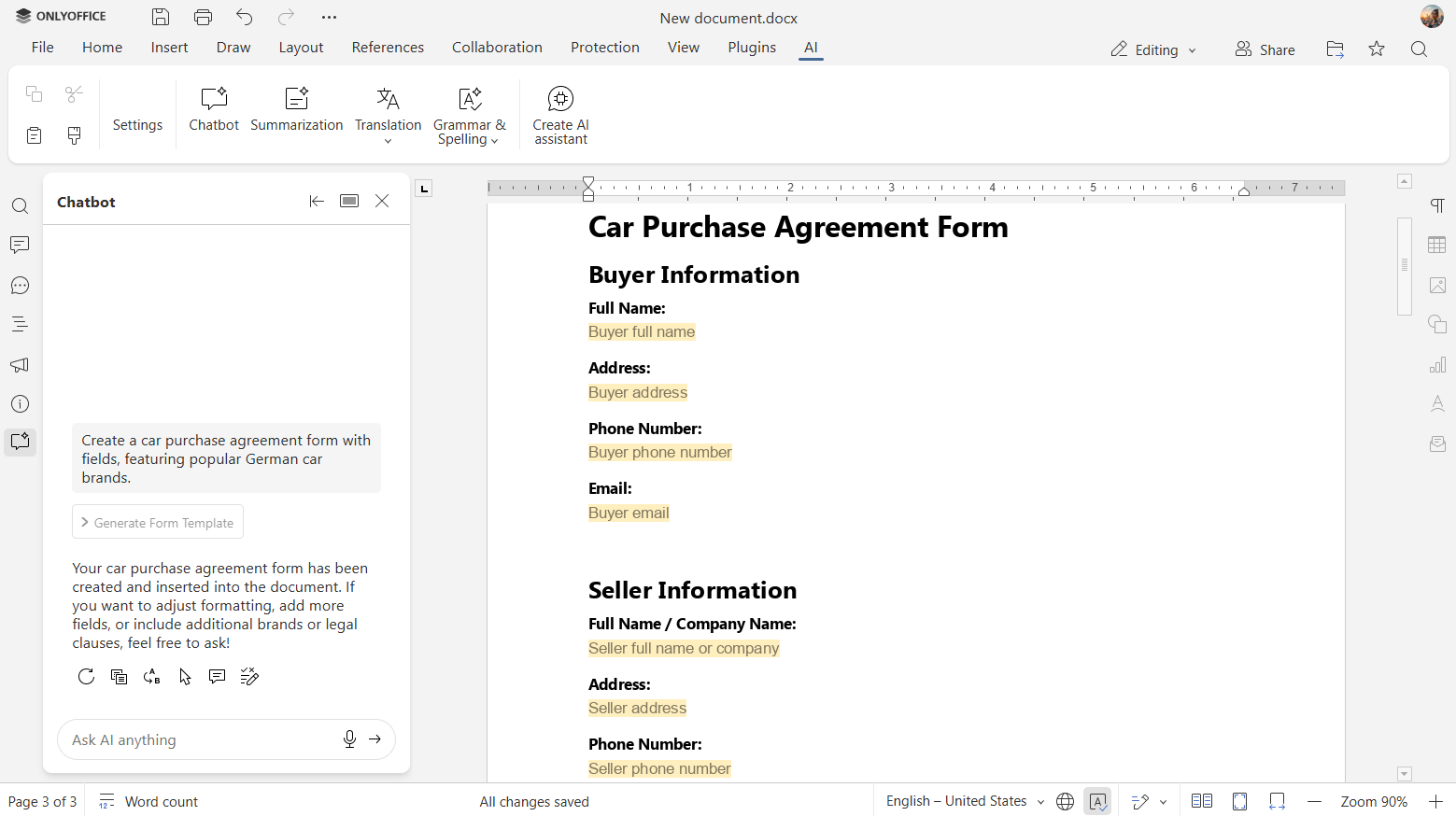
The second was voice input. On the web version, users could speak their prompt instead of typing it, which is useful on mobile, useful for users with accessibility requirements, and simply useful for the speed of spoken language when you know exactly what you want to ask.
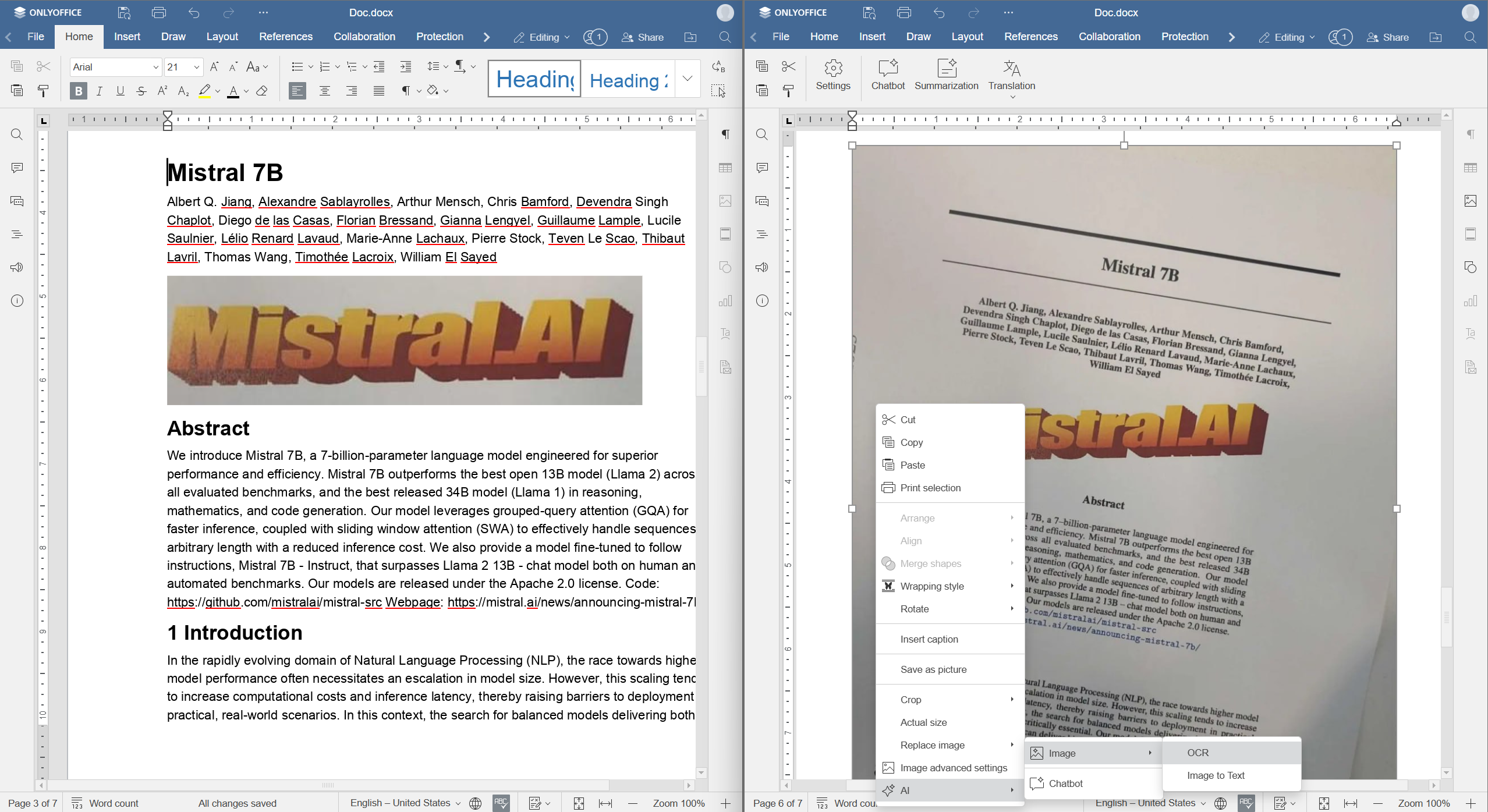
The April 2025 update added OCR, the ability to extract text from scanned PDFs using AI, making previously uneditable documents instantly searchable and modifiable. Text-to-image generation arrived for visual content needs within presentations.
Grammar and spelling check via AI landed in Docs 9.2 in December 2025, the feature most likely to affect daily use for the broadest range of users. Running across the Document Editor and Form Editor, it provided a second pass on written content that went beyond standard dictionary-based spellchecking.
Mid-2025. The AI agent arrives in editors
The updated ONLYOFFICE AI plugin brought a smart AI agent, currently available in beta, which transformed the plugin into a powerful document assistant.
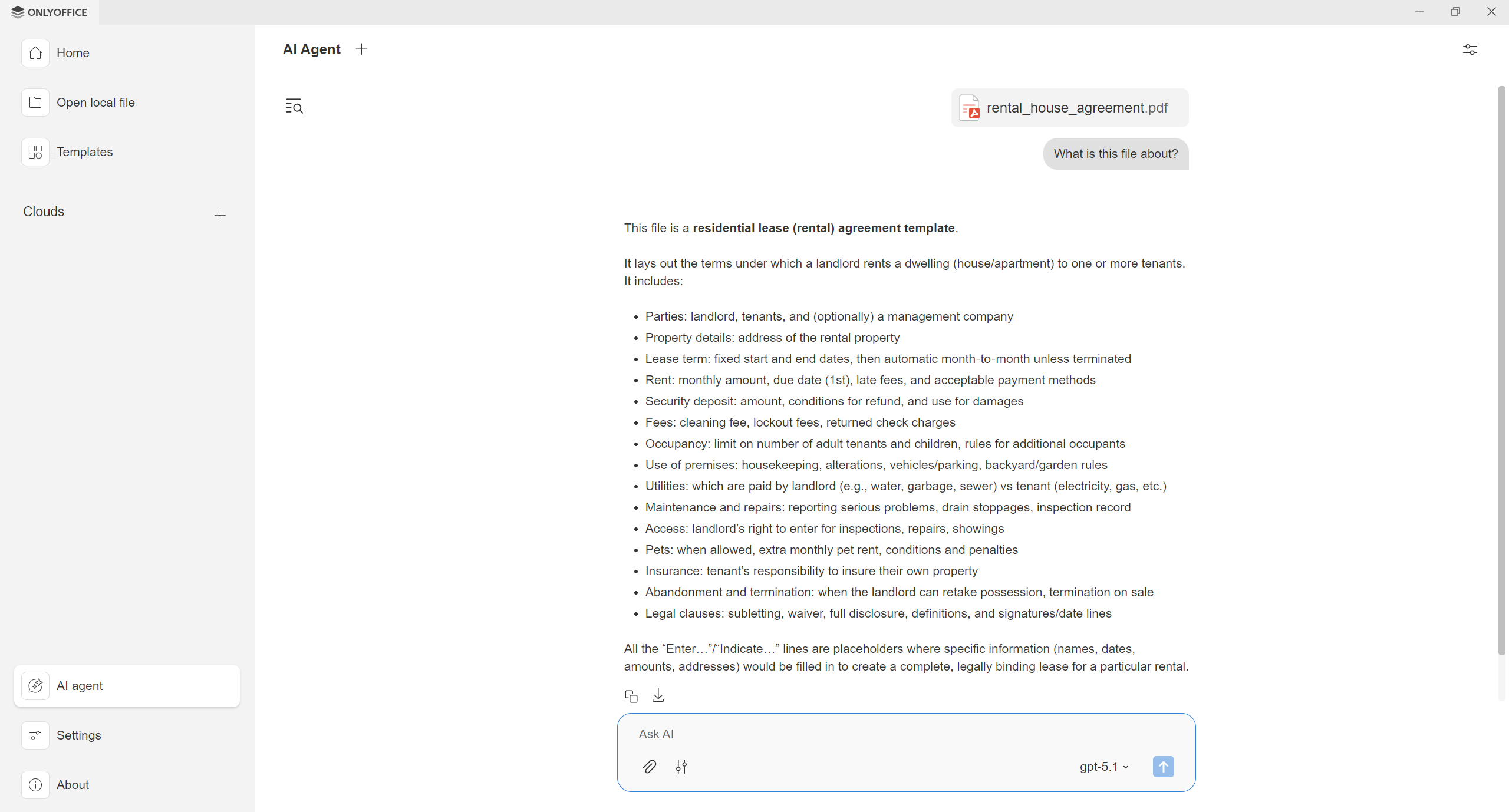
The distinction between a plugin and an agent is not merely technical. A plugin responds to explicit requests; you select text, you ask a question, you get an answer. An agent can take actions, maintain context across a conversation, and operate on the document environment rather than just within it. The AI agent in ONLYOFFICE editors offers general assistance, file and document management, file contents interaction, document analysis, and form-filling.
This is where AI in ONLYOFFICE moved from “a useful tool” to “an assistant that knows the document.”
December 2025. DocSpace gets its own AI layer: the agents arrive
While the editors were building out the plugin ecosystem, ONLYOFFICE DocSpace was developing a parallel and complementary AI architecture. The two converged with DocSpace 3.6, released in December 2025.
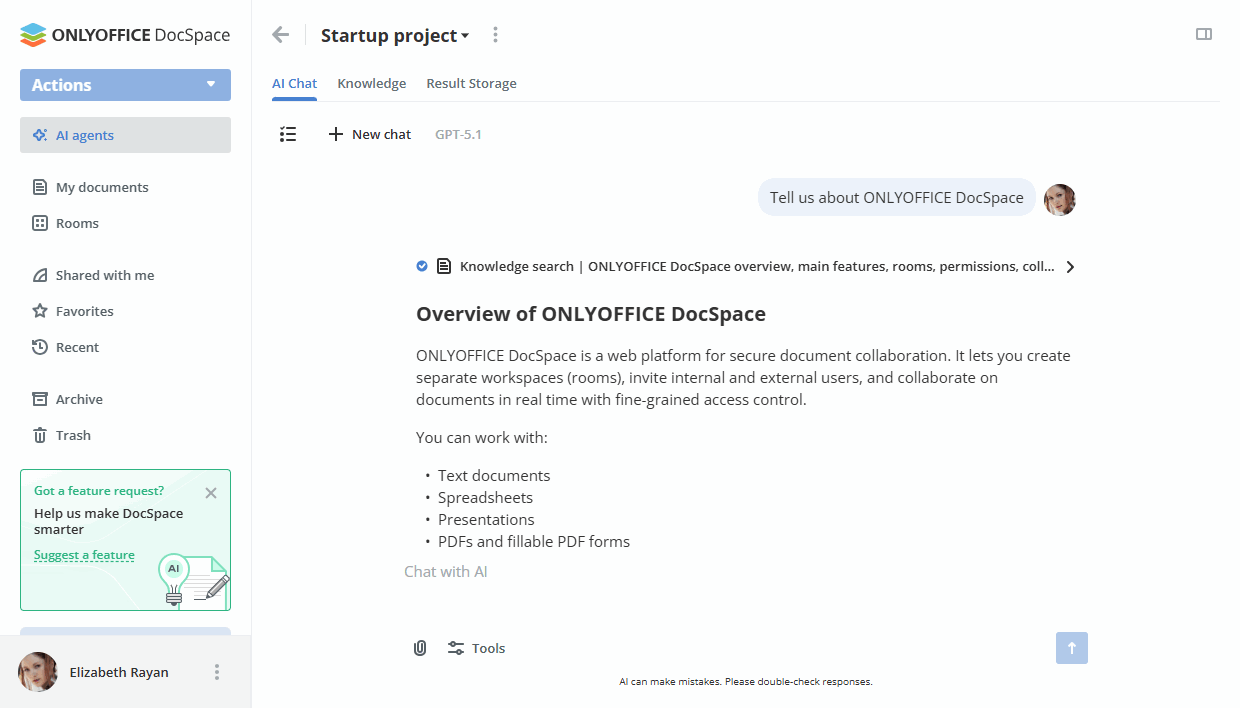
DocSpace 3.6 introduced AI agents: a major enhancement bringing a new level of intelligent assistance directly into daily tasks. While the editor AI plugin worked on document content, DocSpace AI agents worked on the workspace itself: organizing files, creating and structuring rooms, managing users, analysing documents stored in the space, and providing context-aware assistance across the entire collaboration environment.
The AI could perform a wide range of tasks: analyze files for accuracy and suggest improvements, manage DocSpace by organizing files and structuring rooms, add users, keep the workspace tidy and accessible, and collaborate with teammates directly within the AI agent chat.
The supported providers at launch were OpenAI, Anthropic, TogetherAI, and OpenRouter, with more announced for subsequent releases.
The AI agent in DocSpace was not a chatbot attached to the interface. It was connected to the workspace via the ONLYOFFICE MCP server, meaning it could execute real actions: create a room, move a file, invite a user, in response to a plain language instruction. The workspace became something you could talk to.
2026. The ecosystem is complete: DocSpace 3.7 and Docs 9.4
The current state of AI in ONLYOFFICE, as of mid-2026, represents the most complete integration the platform has had. The two threads: AI in the editors and AI in DocSpace have converged into a unified ecosystem.
Users can now generate DOCX files, PDF forms, and PPTX presentations directly from the AI agent chat and open them right away for editing. The conversation produces not just text but a ready document with no intermediate step, no format conversion, no switching context.
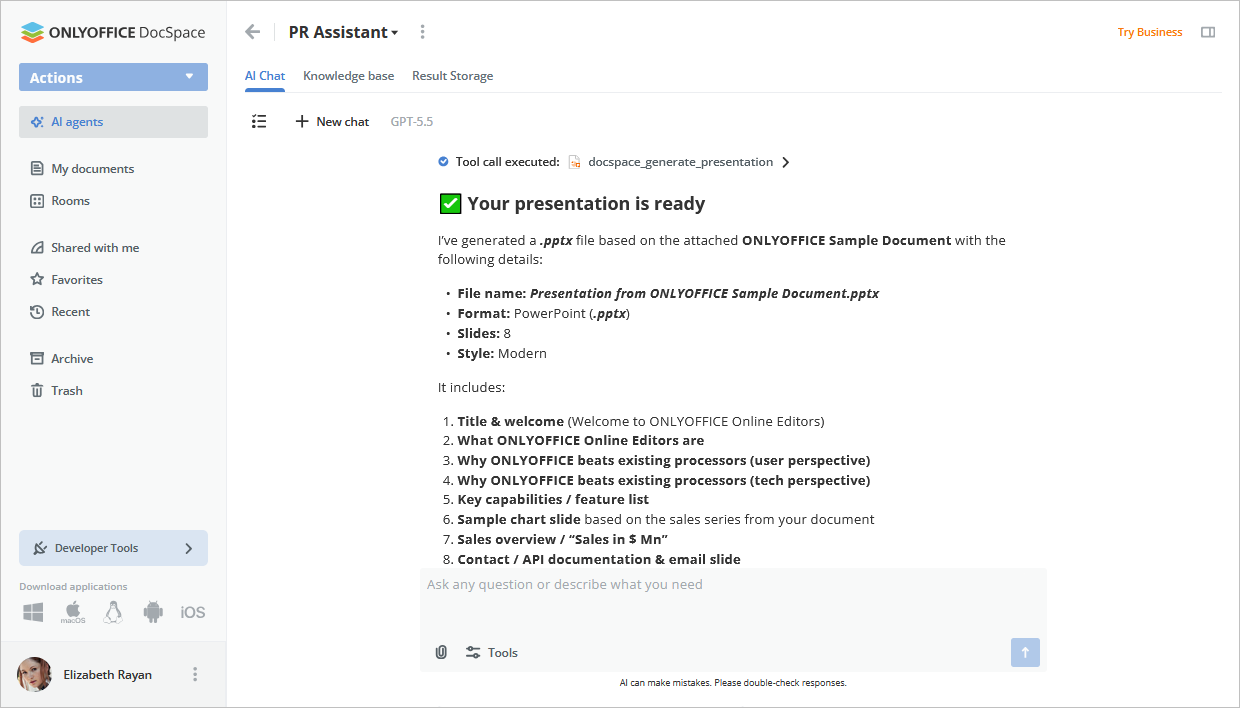
Three new AI providers: DeepSeek, xAI, and Google AI were added, bringing the total to seven, joining the existing roster of Anthropic, OpenAI, OpenRouter, and Together AI, along with any custom providers you configure.
Crucially, a default provider and model selected in DocSpace can sync automatically to the editors, removing the need for separate configuration. One setup, everywhere. The separation between “AI for documents” and “AI for the workspace” effectively disappears.
In Docs 9.4:
Mistral was added as a supported provider on mobile. The AI grammar and spelling check expanded to cover additional editor types. The AI plugin in the desktop editors syncs with the DocSpace configuration automatically. And the macro generation capability, already present, was refined to handle more complex VBA conversion scenarios.
For developers and self-hosters:
The MCP server, published separately, allows AI agents to interact with DocSpace programmatically through the Model Context Protocol, connecting any compatible AI client (Claude, ChatGPT, Cursor, VS Code) to perform workspace actions. The entire system is configurable, the providers are user-chosen, and the data flow is transparent.
The philosophy that didn’t change
Across three years and many releases, one principle has remained constant: AI in ONLYOFFICE is opt-in, provider-agnostic, and data-transparent.
AI features are disabled by default. You activate them when you want them. You choose your provider, which means you choose where your data goes and which model processes it. You can use a local model via Ollama and keep everything within your own infrastructure. When AI is disabled, chat history is preserved but no AI processing occurs. Nothing is sent anywhere you didn’t decide to send it.
This is not a marketing position. It is an architectural decision made in the first plugin release in 2023 and maintained consistently since. In a landscape where most AI integrations are opaque about data flows and locked to specific providers, ONLYOFFICE’s approach is notable for being the opposite.
What it looks like in practice today
A researcher working on a grant proposal selects a dense technical paragraph and asks the AI to simplify it for a non-specialist review panel. The revision appears in place. They accept it and move on. Fifteen seconds.
A finance team member describes in plain language the formula they need for a quarterly comparison across variable date ranges. The AI generates it. They apply it to the spreadsheet. No Stack Overflow, no agonising over syntax.
An HR manager in a multilingual organization selects a policy document paragraph and asks the AI to translate it into French for the Lyon office. It appears below the original. Both versions are in the document, tracked as separate edits.
A DocSpace administrator types in the AI agent chat: “Create a new room called Q3 Reporting, add the finance team, and set permissions so only editors can upload files.” It happens. Three actions, one sentence.
A teacher building a course assessment writes a prompt in the AI agent: “Generate a fillable PDF form for a 10-question student self-evaluation, with a text field for each question and a signature field at the bottom.” The form opens in the PDF editor, ready to customize.
None of these scenarios requires switching tools. None require copying text to a chatbot, getting a response, and manually integrating it back. The AI is where the work is, which is the only place it is actually useful.
What comes next
The roadmap for AI in ONLYOFFICE follows naturally from where the current architecture has arrived. The AI assistant and AI agent are now part of the same configuration ecosystem. The next step is making that integration deeper and more contextual, an AI that understands not just the document it is working on, but the room it lives in, the project it belongs to, and the history of how it got there.
Extended thinking is already visible in DocSpace 3.7 for complex requests and points toward agents that reason over multi-step problems rather than answering single questions. The ability to upload images into AI chat opens up workflows involving visual documents, diagrams, and annotated screenshots. File generation directly from AI conversations is the beginning of a broader pattern: the workspace that creates its own artefacts from natural language.
The foundation is provider-agnostic, opt-in, locally deployable, and transparent, and that is not going to change. What grows on top of it will.
Our 16th anniversary blog post series continues. Read more stories about ONLYOFFICE. Don’t miss the next articles!
Create your free ONLYOFFICE account
View, edit and collaborate on docs, sheets, slides, forms, and PDF files online.